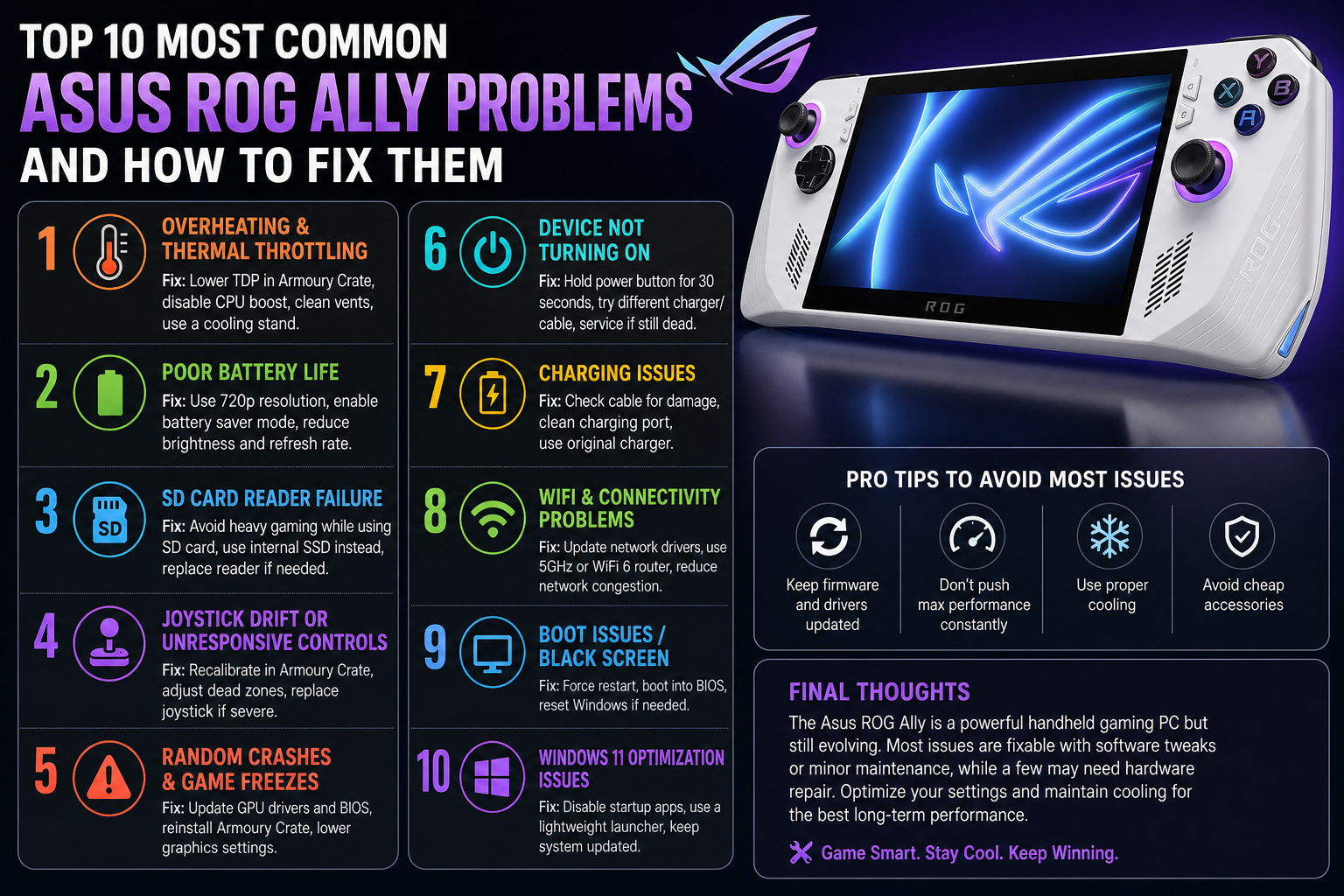
Top 10 Most Common Asus ROG Ally Problems and How to Fix Them
The Asus ROG Ally is one of the most powerful handheld gaming PCs available — but like any complex piece of hardware, it has its share of common problems. From joystick drift to overheating, battery drain to charging port issues, these faults affect a large number of ROG Ally owners and often appear after several months of regular use.
The good news is that most ROG Ally problems are fixable. In this guide we cover the 10 most common Asus ROG Ally problems, what causes them, what you can do yourself, and when it’s time to get a professional repair.
Top 10 Most Common Asus ROG Ally Problems and How to Fix Them
1. Asus ROG Ally Joystick Drift
What is it?
Joystick drift is the most reported ROG Ally problem. It happens when the analog stick registers movement without any physical input — your character moves on its own, your aim shifts during a gunfight, or menus scroll without you touching anything. It ruins competitive games and makes precise control impossible.
How to fix it?
Short-term workaround: Go to ROG Armoury Crate → Controller settings → Deadzone and increase the deadzone value slightly. This masks minor drift but doesn’t fix the underlying problem.
Permanent fix: Joystick replacement by a repair technician. The faulty analog stick module is replaced with a new precision component, completely eliminating drift. This is one of the most common and straightforward ROG Ally repairs.
Repair cost: AED 150 – 300
2. Asus ROG Ally Overheating & Thermal Throttling
What is it?
Overheating is the second most common ROG Ally complaint. Symptoms include the device becoming extremely hot during gaming, the fan running at maximum speed constantly, frame rates dropping suddenly during demanding games (thermal throttling), and in severe cases the device shutting down to protect itself.
What causes it?
The ROG Ally packs powerful hardware into a compact chassis — thermal management is always a challenge. Common causes include dust accumulation in the cooling system blocking airflow, degraded thermal paste between the CPU and heatsink losing its effectiveness over time, and a failing or worn fan that can no longer move adequate air.
How to fix it?
Short-term: Lower TDP settings in ROG Armoury Crate — switch from Performance mode to Balanced or Silent mode to reduce heat generation. Use the device on a hard flat surface rather than soft surfaces like beds which block ventilation.
Permanent fix: Professional cooling system service — deep cleaning of the heatsink and fan, replacement of thermal paste, and fan repair or replacement if needed. After a proper cooling service, temperatures typically drop by 10–20°C under load.
Repair cost: AED 180 – 300
3. Asus ROG Ally Poor Battery Life
What is it?
The original ROG Ally was widely criticised at launch for short battery life — often just 1.5 to 2 hours under demanding gaming loads. Even with the improvements brought by the ROG Ally X, battery degradation over time means many owners find their device lasting significantly less than it did when new.
What causes it?
Battery capacity naturally degrades with charge cycles — after 300–500 full charge cycles, most lithium batteries retain around 80% of their original capacity. High sustained temperatures (from the overheating issue above) accelerate this degradation significantly. Gaming at maximum performance settings constantly also drains the battery faster than the hardware was designed to sustain.
How to fix it?
Short-term: In ROG Armoury Crate, enable Battery Care Mode which limits charging to 80% — this significantly extends long-term battery health. Lower screen brightness and use Balanced power mode during less demanding games.
Permanent fix: Battery replacement restores original battery capacity and playtime. A genuine replacement battery with professional installation brings your ROG Ally back to day-one battery performance.
Repair cost: AED 200 – 350
4. Asus ROG Ally Charging Port Problems
What is it?
Charging port issues are increasingly common on ROG Ally devices after extended use. Symptoms include the device only charging at certain angles, intermittent charging that cuts in and out, the device not recognising the charger at all, or the port feeling loose compared to when new.
What causes it?
The ROG Ally charges via USB-C which doubles as the display output port for docking. This means the port gets heavy use — both for charging and connecting to docks and accessories. Repeated plugging and unplugging causes physical wear on the port’s internal pins and solder joints. Damage can also occur from plugging in cables at an angle or from accidental drops while connected.
How to fix it?
Short-term: Try a different USB-C cable — many charging issues are cable-related rather than port-related. Ensure you’re using a charger that delivers adequate wattage (65W minimum recommended for gaming use).
Permanent fix: Charging port repair or replacement by a technician. A physically damaged or electrically faulty port needs professional repair — attempting to fix this yourself risks further damage to the motherboard.
Repair cost: AED 180 – 320
5. Asus ROG Ally Screen Issues (Cracks, Dead Pixels, Burn-In)
What is it?
Screen problems on the ROG Ally include physical damage from drops (cracks and shattered displays), dead pixels appearing as permanent black or coloured dots on the screen, screen flickering during use, and in rare cases backlight issues causing uneven brightness or dark patches.
What causes it?
Physical screen damage is almost always caused by drops or impacts — the ROG Ally’s 7-inch display is the most vulnerable component on the device. Dead pixels can be manufacturing defects or result from pressure damage. Screen flickering can indicate a loose display connector internally or a failing display driver.
How to fix it?
Short-term: For dead pixels, run a pixel-fixing tool (rapid colour cycling software) — this resolves stuck pixels in some cases. For flickering, check for Windows display driver updates in Device Manager.
Permanent fix: Screen replacement by a repair technician. The 7-inch FHD display is replaced with an OEM-quality panel, restoring full clarity, brightness, and touch sensitivity.
Repair cost: AED 350 – 600
6. Asus ROG Ally Wi-Fi Connectivity Issues
What is it?
Many ROG Ally owners report Wi-Fi problems — slow download speeds despite a fast router, frequent disconnections during online gaming, difficulty maintaining a stable connection, and in some cases the Wi-Fi adapter not being detected at all after Windows updates.
What causes it?
The ROG Ally launched with Wi-Fi driver issues that caused widespread connectivity problems. Asus released firmware and driver updates that resolved most of these. However, some units continue to experience hardware-level Wi-Fi issues related to the Intel Wi-Fi module, and Windows updates occasionally reintroduce driver conflicts.
How to fix it?
Short-term fixes to try yourself:
– Update Wi-Fi drivers through ROG Armoury Crate or Device Manager
– Download the latest BIOS update from Asus’s support page
– Disable Wi-Fi power saving: Device Manager → Network Adapters → Wi-Fi adapter → Properties → Power Management → uncheck “Allow the computer to turn off this device to save power”
– Reset network settings: Settings → Network & Internet → Advanced network settings → Network reset
If none of the above resolves the issue, the Wi-Fi module may need professional diagnosis and replacement.
Repair cost: AED 200 – 350
7. Asus ROG Ally Micro SD Card Not Detected
What is it?
A significant number of ROG Ally owners have experienced their microSD card slot failing — cards not being detected, cards being detected intermittently, or cards being ejected unexpectedly during play. In some early units, the microSD slot caused data corruption on inserted cards.
What causes it?
Asus acknowledged a hardware issue with the microSD card slot on early ROG Ally units — high temperatures from the adjacent SSD caused the slot to overheat, leading to card corruption and detection failures. Asus released a BIOS update that reduced SSD temperatures and largely resolved this issue on updated devices. Physical damage to the slot from incorrect card insertion or debris can also cause detection failures.
How to fix it?
Short-term: Ensure your BIOS is fully updated — this is critical for the microSD slot issue. Use a compressed air can to gently clean the slot of any dust or debris. Try a different microSD card to rule out a faulty card.
Permanent fix: If the slot is physically damaged or continues to malfunction after BIOS updates, professional repair or replacement of the microSD slot is required.
Repair cost: AED 150 – 280
8. Asus ROG Ally Buttons & Triggers Not Working
What is it?
Button and trigger issues include face buttons (A, B, X, Y) becoming unresponsive or requiring excessive force to register, L1/L2 triggers feeling sticky or registering inconsistently, back buttons not working, and the ROG button or Armoury Crate button failing to respond.
What causes it?
Physical button failures are usually caused by debris getting underneath buttons, worn contact pads from heavy use, or physical damage from drops. Trigger issues can be mechanical — worn springs or damaged trigger mechanisms — or software-related, particularly after Windows updates that affect controller input drivers.
How to fix it?
Short-term: In ROG Armoury Crate, remap affected buttons to test if the issue is hardware or software. Restart the device and check for controller driver updates. Gently clean around buttons with compressed air.
Permanent fix: Button and trigger repair or replacement by a technician. All physical controls on the ROG Ally can be repaired or replaced individually without needing a full device replacement.
Repair cost: AED 100 – 250
9. Asus ROG Ally Windows & Software Issues
What is it?
As a Windows device, the ROG Ally inherits all the software instability that can affect any Windows PC. Common software issues include boot loops after failed Windows updates, ROG Armoury Crate crashes or failing to load, games crashing or failing to launch, black screen on startup, and performance degradation over time as the SSD fills and Windows accumulates background processes.
What causes it?
Windows updates sometimes conflict with ROG Ally-specific drivers. ROG Armoury Crate — which manages TDP settings, fan curves, and controller mapping — can become corrupted and cause system instability. Installing incompatible software or games that modify system files can also lead to instability.
How to fix it?
Short-term fixes to try yourself:
– Run Windows Update and ensure all drivers are current
– Uninstall and reinstall ROG Armoury Crate from Asus’s official site
– Use Windows System Restore to roll back to a stable state
– Run SFC /scannow in Command Prompt to repair corrupted Windows files
– Factory reset through Windows Settings → Recovery
Permanent fix: If the above fails, a clean Windows reinstallation by a repair technician restores the device to full working order. Data recovery is performed before reinstallation where possible.
Repair cost: AED 150 – 300
10. Asus ROG Ally SSD Storage Running Out
What is it?
Not a fault exactly — but one of the most common complaints from ROG Ally owners. The stock 512GB SSD fills up surprisingly fast with modern game installs. AAA titles regularly exceed 100GB each, meaning a 512GB drive fills up after just 4–5 large game installs. A full SSD also noticeably slows Windows performance.
What causes it?
Modern games are simply enormous in file size. Combined with Windows itself taking 40–60GB, ROG Armoury Crate, game launchers, and updates, the 512GB SSD leaves limited room for a meaningful game library. The microSD slot offers additional storage but microSD cards are significantly slower than NVMe SSDs for game loading.
How to fix it?
Short-term: Use a fast microSD card (UHS-I or UHS-III) for storing less frequently played games. Regularly uninstall games you’ve finished. Move large files to cloud storage.
Permanent fix: NVMe SSD upgrade to 1TB or 2TB. A professional SSD upgrade replaces the internal drive with a faster, larger NVMe SSD. Your existing data and Windows installation are cloned during the upgrade — nothing is lost. After upgrading to 2TB you’ll have room for 15–20 large AAA games simultaneously.
Upgrade cost: AED 350 – 950 depending on capacity
When Should You Repair vs Replace Your Asus ROG Ally?
In almost every case — repair. Here’s why:
A new Asus ROG Ally costs AED 2,000 or more. Most common repairs cost between AED 150 and AED 600. Even combining two or three repairs — joystick replacement, battery replacement, and a cooling service — costs a fraction of a replacement device. With a 12-month warranty on professional repairs, you get reliable, long-term value at a fraction of replacement cost.
The only scenario where replacement makes sense is catastrophic motherboard failure combined with severe physical damage — and even then a professional diagnosis first is worthwhile.
Frequently Asked Questions — Asus ROG Ally Problems
What is the most common problem with the Asus ROG Ally?
Joystick drift is the most commonly reported ROG Ally problem, followed by overheating and battery drain. All three are repairable and none require replacing the whole device.
Does Asus ROG Ally have overheating problems?
Yes — overheating is a well-documented issue on the ROG Ally, particularly on the original model. The ROG Ally X improved thermal management with a better cooling system, but both models benefit from periodic cooling system servicing including thermal paste replacement and fan cleaning.
How long does the Asus ROG Ally battery last?
The original ROG Ally lasts approximately 1.5–2 hours under heavy gaming loads. The ROG Ally X with its larger 80Wh battery extends this to 3–4 hours. Battery capacity degrades over time — if your ROG Ally’s battery life has dropped significantly from when it was new, a battery replacement will restore original performance.
Can Asus ROG Ally joystick drift be fixed permanently?
Yes. Increasing the deadzone in software is a temporary workaround. The permanent fix is joystick replacement — replacing the faulty analog stick module with a new component completely eliminates drift and is covered by a repair warranty.
Is the Asus ROG Ally worth repairing?
Yes — in almost every case. Most common ROG Ally repairs cost between AED 150 and AED 600. A replacement device costs AED 2,000 or more. Professional repair with a 12-month warranty is the most cost-effective solution for the vast majority of ROG Ally faults.
Most Asus ROG Ally problems — joystick drift, overheating, battery degradation, charging port faults, and screen damage — are entirely fixable without replacing the device. Catching problems early and getting them repaired professionally extends the life of your ROG Ally significantly and saves you thousands compared to buying new.
If your ROG Ally is experiencing any of the problems above, RepairZone provides professional ROG Ally repair in Dubai and across the UAE — with free pickup and delivery, free diagnostic assessment, and a 12-month warranty on every repair.
We use cookies to ensure that we give you the best experience on our website. If you continue to use this site we will assume that you are happy with it.