Business WiFi Setup Dubai – Professional Office & Commercial Network Installation
Consumer routers cannot support a real office. RepairZone installs enterprise-grade WiFi networks for Dubai offices, retail stores, clinics, warehouses, and commercial spaces — with full coverage, guest network isolation, and the performance your team needs to stay productive.
⚡ Key Takeaways – Business WiFi Setup in Dubai
- What we do: Enterprise access point installation, VLAN segmentation, guest network isolation, QoS configuration, and full commercial network setup.
- Who we serve: Offices, retail stores, clinics, warehouses, restaurants, and event venues across Dubai.
- Hardware: Ubiquiti UniFi-6 Pro, TP-Link Omada EAP670, Netgear WAX series, Cisco Meraki — no consumer-grade equipment on business projects.
- Response time: Same-day and scheduled appointments. Technicians reach your location within 30–60 minutes.
- Starting from AED 399 — includes router configuration, access point installation, guest SSID, and QoS setup. Full itemised quote provided before work begins.
- Compliance: All installations carry TDRA type-approval certification. Guest networks configured to meet UAE data handling requirements.
📞 Call or WhatsApp us now to book a same-day site assessment.
Why Your Office Needs a Proper Business WiFi Setup
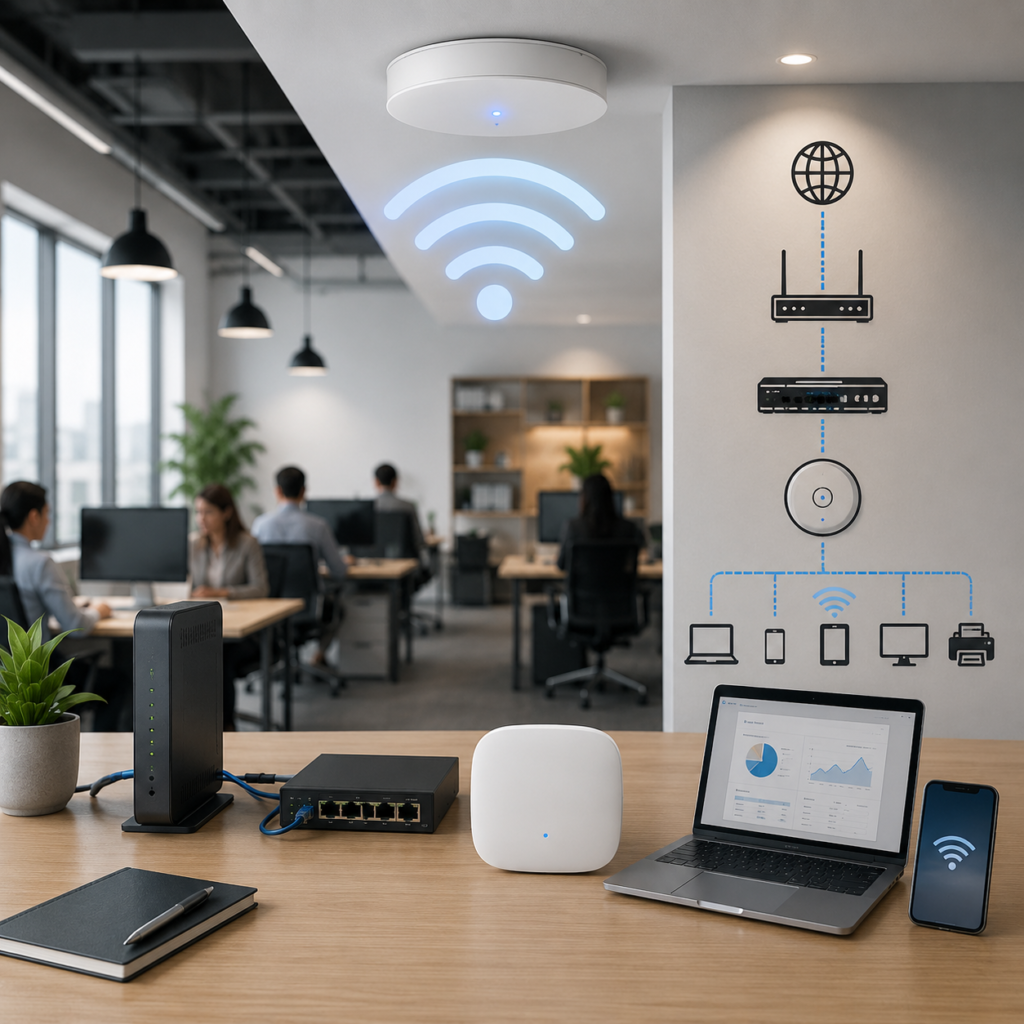
A home router running an office network is one of the most common pitfalls growing Dubai businesses encounter — and one of the most damaging to daily productivity.
Consumer routers are designed for 10–15 casual connections in a home environment. In an office with 15 employees, each using 2–3 devices, plus VoIP phones, a shared printer, a cloud-based POS system, and video calls running simultaneously, a consumer router hits its limits fast. The result: dropped calls, buffering video conferences, slow file uploads, and random disconnections during critical work.
Business WiFi systems are built differently. Enterprise access points handle 50–200+ concurrent connections, prioritise traffic for video conferencing and VoIP, keep guest visitors completely separated from your internal network, and give you a management dashboard to monitor and control everything from one place.
RepairZone designs and installs business WiFi networks across Dubai — from single-room offices to multi-floor commercial properties. We work with businesses of all sizes and tailor the solution to your team’s specific needs.
What RepairZone’s Business WiFi Setup Includes
- Business Router Configuration — Enterprise router setup with proper WAN (Wide Area Network — your connection to the internet) configuration, firewall settings, and DHCP scoping for your device count.
- Enterprise Access Point Installation — Ceiling or wall-mounted access points placed for optimal coverage across your office floor plan. Powered via PoE (Power over Ethernet — a single cable that carries both data and electrical power, eliminating the need for separate power outlets at each AP). Supports 50–200 concurrent connections per AP with no performance degradation.
- VLAN & Network Segmentation — Separate logical networks for internal staff, guest visitors, IoT devices (printers, cameras, POS), and VoIP — all on the same physical infrastructure but completely isolated from each other.
- Guest WiFi Network — A dedicated SSID (network name) for clients and visitors that provides internet access without any visibility to your internal systems, shared files, or connected staff devices.
- QoS — Traffic Prioritisation — QoS (Quality of Service — rules that prioritise critical traffic over less time-sensitive data) ensures video conferencing, VoIP calls, and cloud applications are never starved of bandwidth by general browsing or large downloads.
- WiFi Security Configuration — WPA2/WPA3 Enterprise encryption, admin credential hardening, remote access disabled, rogue AP detection where supported by hardware.
- Speed & Coverage Testing — Post-installation testing across all areas of the office, including meeting rooms, reception, storerooms, and outdoor areas if applicable.
- Staff Onboarding — We walk your team through connecting to the correct network, accessing the guest SSID, and basic troubleshooting. You receive all network credentials and a simple reference card.
How to Set Up Business WiFi in Dubai – Step by Step
For businesses planning a new office network or upgrading an existing one, here is how a professional business WiFi installation in Dubai works from start to finish.
- Site Survey — A technician visits your premises to assess the floor plan, wall materials, ceiling height, number of users, and existing cabling infrastructure. This determines the number of access points required and optimal placement positions. Skipping this step is the single most common reason business WiFi installations underperform.
- Solution Design — Based on the survey, we recommend the right hardware platform (Ubiquiti UniFi, TP-Link Omada, or Cisco Meraki), number of access points, VLAN structure, and ISP connection type for your team size and usage pattern.
- Hardware Procurement — We advise on the most cost-effective hardware for your requirements at cost price. You can purchase through us or source independently — we install either way.
- Installation — Access points are ceiling or wall-mounted, cabled via PoE switches where required, and connected to the business router. The controller software is configured for centralised management.
- Network Configuration — VLANs created for staff, guest, IoT, and VoIP traffic. QoS rules applied. Guest SSID enabled with bandwidth limits. Security settings hardened.
- Testing & Handover — Full coverage testing across all areas. Speed verification on each network segment. Staff briefing and credential handover. Documentation provided.
We complete most small to medium office installations in one business day.
Why a WiFi Site Survey Matters Before Installation
A WiFi site survey is a physical assessment of your premises that identifies signal obstacles — concrete pillars, metal partitions, glass walls — maps existing interference from neighbouring networks, and determines the exact number and placement of access points needed for reliable, full-property coverage. Without a site survey, access points are placed by guesswork, which routinely results in dead zones, overlap interference between APs, and underperformance even with premium hardware.
In Dubai’s commercial buildings — particularly the mixed-use towers in Business Bay, JLT, and DIFC — floor plates often have irregular shapes, multiple meeting rooms with different wall densities, and high levels of WiFi interference from dozens of neighbouring tenants. A Business Bay office on the 25th floor of a glass-and-steel tower has entirely different RF (radio frequency) characteristics to an Al Quoz warehouse unit with metal racking and 8-metre ceilings — both need a site survey, but the AP placement strategy is completely different.
RepairZone conducts a site survey as the first step of every business WiFi project. For larger commercial deployments, we provide a written coverage plan and AP placement map before installation begins.
Business WiFi Solutions by Industry
Office WiFi Setup in Dubai
Standard office environments — from small 5-person setups to 50+ employee floors — need WiFi that supports simultaneous video calls, cloud applications, shared printing, and mobile device use without performance drops.
Our office WiFi setup covers:
- Access point quantity and placement based on floor plan and desk density
- Separate SSIDs for internal staff and guest visitors
- QoS configuration to prioritise Microsoft Teams, Zoom, and VoIP
- Bandwidth management to prevent individual devices from saturating the connection
- Controller-based management for remote monitoring and updates
Common office locations we serve: DIFC, Sheikh Zayed Road, Business Bay, JLT, Dubai Internet City, Media City, Deira, Bur Dubai, Al Barsha.
Retail & Showroom WiFi Setup in Dubai
Retail environments require two completely separate networks: a reliable internal network for POS systems, inventory management, and staff devices, and a customer-facing guest network that is fast enough to impress without any access to internal systems. Payment terminal security makes this separation non-negotiable.
Our retail WiFi setup includes:
- POS and payment terminal network prioritisation
- Customer WiFi SSID with captive portal option (login page for brand engagement)
- Complete network isolation between POS/back-office and customer networks
- Coverage across retail floor, stockroom, and fitting rooms or service areas
Clinic & Medical Practice WiFi in Dubai
Healthcare environments in Dubai have strict data sensitivity requirements. Patient-facing guest WiFi must be completely isolated from clinical systems, electronic health records, and connected medical devices. Our clinic WiFi setup guarantees compliance with UAE data handling best practices.
Our clinic WiFi setup includes:
- Clinical system VLAN isolated from patient WiFi
- Medical device connectivity on dedicated network segment
- Encrypted WPA2/WPA3 configurations for clinical staff network
- Reception and waiting area patient WiFi
Warehouse & Industrial WiFi in Dubai
Warehouses in Dubai Industrial City, Jebel Ali, DIP, and Al Quoz present unique challenges: large open spaces, high ceilings, metallic shelving that attenuates (weakens) signals, and the need for WiFi to reach racking areas, loading bays, and offices simultaneously.

Our warehouse WiFi installation includes:
- High-gain directional or omnidirectional access points for large-area coverage
- AP placement accounting for shelving and structural interference
- Coverage testing at floor level in all operational zones
- Separate networks for logistics software, barcode scanners, and staff devices
Restaurant & Café WiFi in Dubai
Dubai’s competitive F&B sector means customers expect strong, fast WiFi from the moment they sit down. Restaurant WiFi must reliably support both back-of-house POS and kitchen display systems, and front-of-house customer access — simultaneously during peak service hours.
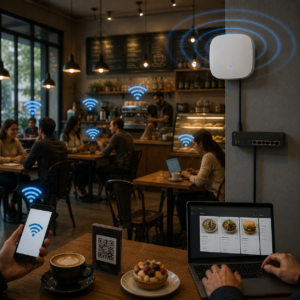
Our restaurant WiFi setup includes:
- Customer SSID with speed limits to prevent bandwidth monopolisation
- POS and kitchen system isolation from customer network
- Peak-hour load testing during setup
- Outdoor terrace and garden coverage where applicable
Outdoor WiFi for Dubai Businesses – Heat, Humidity, and Environmental Factors
Outdoor WiFi installations in Dubai require hardware selected specifically for Gulf climate conditions. Standard indoor access points fail rapidly when exposed to Dubai’s summer temperatures — regularly exceeding 45°C — and the high coastal humidity of areas such as Dubai Marina, Palm Jumeirah, and JBR.
RepairZone installs IP-rated weatherproof outdoor access points rated for Gulf conditions. Key considerations for every outdoor business WiFi installation in Dubai:
- Temperature rating — Outdoor APs must be rated for operating temperatures above 55°C. We specify hardware with appropriate thermal tolerances for rooftop, terrace, and poolside installations.
- IP rating — IP66 or IP67-rated enclosures protect against dust ingress (critical in Dubai’s sandy environment) and water exposure from cleaning or rain.
- Mounting position — APs positioned with ventilation clearance and away from direct west-facing sun exposure extend hardware lifespan significantly in Dubai’s climate.
- Signal planning — Outdoor spaces require directional antenna planning to maximise coverage across terraces, gardens, car parks, and loading areas without signal waste.
Common outdoor business WiFi projects we complete: restaurant and café terraces, hotel pool decks, retail outdoor areas, warehouse loading bays, resort grounds, and event spaces.
WiFi 6 and WiFi 6E for Dubai Offices – Is It Worth Upgrading?
WiFi 6 (802.11ax) and WiFi 6E are the current generation of wireless standards, delivering significantly higher throughput, better performance in high-density environments, and lower latency compared to WiFi 5 (802.11ac).
For Dubai offices specifically, WiFi 6 delivers measurable improvements because:
- High device density — WiFi 6 uses OFDMA (Orthogonal Frequency Division Multiple Access — a technology that serves multiple devices simultaneously on the same channel rather than sequentially) to eliminate the queuing delays that cause video call stuttering and slow file syncing on WiFi 5 networks with 20+ devices.
- Interference resilience — Dubai’s commercial districts have extreme WiFi channel congestion from neighbouring tenants. WiFi 6’s BSS Colouring technology reduces interference from neighbouring networks operating on the same channel — a direct fix for one of Dubai’s most common office WiFi complaints.
- WiFi 6E — 6 GHz band — WiFi 6E adds a third frequency band (6 GHz) that is completely clear of legacy device interference. The UAE’s Telecommunications and Digital Government Regulatory Authority (TDRA) has approved the 6 GHz band for unlicensed indoor use, making WiFi 6E fully legal and operational in Dubai.
- Future-proofing — All hardware RepairZone installs today is WiFi 6 capable, ensuring a 5–7 year performance lifecycle as device counts grow.
WiFi 6 upgrades are recommended for offices with 20+ concurrent users, high video conferencing usage, or persistent performance issues on existing networks. Learn more about the WiFi 6 certification standard from the Wi-Fi Alliance.
UAE Regulatory Compliance for Business WiFi
Business WiFi installations in Dubai must comply with regulations set by the Telecommunications and Digital Government Regulatory Authority (TDRA) — the UAE’s national regulator for telecommunications infrastructure and spectrum licensing.
Key compliance requirements for Dubai businesses:
- Approved frequency bands — Only TDRA-approved frequency bands may be used. The 2.4 GHz and 5 GHz bands are approved for unlicensed use. The 6 GHz band (WiFi 6E) is approved for indoor unlicensed use. Hardware operating outside approved bands is illegal in the UAE.
- TDRA type-approval certification — WiFi access points and routers imported into the UAE must carry TDRA type-approval certification, identifiable by the official TDRA approval sticker on the hardware packaging. All hardware RepairZone installs carries valid TDRA certification.
- Guest WiFi networks — UAE cybercrime law requires businesses operating public or guest WiFi networks to maintain logs of connected users. Captive portal systems with user authentication are the standard compliance approach for commercial guest WiFi in Dubai.
- Data protection — Businesses handling customer data over WiFi networks must comply with UAE Federal Decree-Law No. 45 of 2021 on Personal Data Protection. Guest network isolation and encrypted internal networks are the baseline technical requirements.
Our installations guarantee TDRA compliance — we specify only certified hardware and configure guest networks with captive portal authentication as standard on all commercial projects.
Managed WiFi vs In-House IT – Which Is Right for Your Dubai Business?
Once your business WiFi is installed, you have two options for ongoing management: handle it internally with your own IT staff, or outsource to a managed WiFi provider. The right choice depends on your team size, IT expertise, and tolerance for network downtime.
| Factor | In-House IT Management | Managed WiFi Service |
|---|---|---|
| Upfront cost | Lower (no service contract) | Higher (ongoing monthly/annual fee) |
| Ongoing cost | Staff time + reactive repair costs | Predictable fee — no surprise repair bills |
| Response to issues | Depends on staff availability | SLA-guaranteed response time |
| Firmware and security updates | Manual — often delayed | Managed proactively |
| Best for | Businesses with dedicated IT staff | SMEs without in-house IT expertise |
| Network visibility | Full — you control the dashboard | Shared — provider monitors remotely |
For most Dubai SMEs without a dedicated IT team, a WiFi annual maintenance contract (AMC) is the more cost-effective approach — it eliminates unplanned repair costs and ensures firmware and security updates are applied consistently. RepairZone offers WiFi AMC contracts covering firmware updates, security audits, performance checks, and priority response. Contact us for AMC pricing based on your network size.
Common WiFi Interference Problems in Dubai Business Districts
Dubai’s commercial districts — particularly JLT, Business Bay, DIFC, and Dubai Internet City — have some of the highest WiFi channel congestion in the region. Office towers with dozens of tenants each running their own networks create significant interference that degrades performance even on well-configured systems.
The most common interference issues our technicians resolve in Dubai offices:
- Co-channel interference — Multiple networks using the same WiFi channel cause devices to wait their turn, slowing throughput for everyone. We resolve this via channel planning using a WiFi scanning tool to identify underused channels, or by upgrading to WiFi 6 which handles co-channel interference using BSS Colouring technology.
- Adjacent channel interference — Partially overlapping channels cause worse performance than full overlap. On 2.4 GHz, only channels 1, 6, and 11 are non-overlapping — we configure only these on every installation. On 5 GHz, significantly more non-overlapping channels are available.
- Microwave and Bluetooth interference — Kitchen areas with microwaves and offices with many Bluetooth devices generate interference on the 2.4 GHz band. We resolve this by moving critical devices to the 5 GHz band via band steering configuration.
- Building material attenuation — Reinforced concrete, glass partitions, and metallic office furniture all reduce WiFi signal strength. We resolve coverage gaps with additional access points or wired backhaul behind high-attenuation materials.
Etisalat (e&) vs du – Which Business Broadband Is Better for Office WiFi?
Both e& (Etisalat) and du offer business broadband plans in Dubai. The choice between them depends primarily on which provider has fiber infrastructure in your building — not plan pricing alone.
| Factor | Etisalat (e&) | du |
|---|---|---|
| Coverage | Wider — available in most Dubai buildings | Strong in newer developments and free zones |
| Business plan speeds | 100 Mbps to 10 Gbps | 100 Mbps to 2 Gbps (most areas) |
| Free zone presence | Strong in DIFC, SZR corridor | Strong in DMCC, DSO, Dubai South |
| Static IP availability | Available on business plans | Available on business plans |
| SLA for business lines | Available on dedicated plans | Available on dedicated plans |
RepairZone technicians configure router and network settings for both e& and du business connections. If your building has both providers available, we advise on the technical differences relevant to your specific use case before you commit to a plan.
Business-Grade Hardware We Install
We install only high-end professional equipment rated for commercial environments. No consumer-grade hardware on business projects — ever.
Ubiquiti UniFi (UniFi-6 Pro / U6-Enterprise)
Industry-leading enterprise WiFi with centralised cloud or local controller management. Best for offices and commercial spaces requiring full network visibility and multi-site management. Highly scalable — start with 2 APs and expand without reconfiguring. The UniFi-6 Pro supports WiFi 6 with 5.3 Gbps aggregate throughput, suitable for high-density Dubai office floors.
TP-Link Omada (EAP670 / EAP660 HD)
Cost-effective business WiFi with excellent performance for small to medium offices. The EAP670 delivers WiFi 6 with up to 5.4 Gbps throughput. Controller-based management, seamless roaming, VLAN and guest network support. Ideal for retail, clinics, and SME office environments across Dubai.
Netgear Business (WAX630 / WAX640)
Robust WiFi 6 access points for high-density device environments. Well-suited for offices with a high ratio of modern laptops and mobile devices, and retail environments with heavy customer WiFi usage.
Cisco Meraki (MR Series — Enterprise)
Enterprise cloud-managed WiFi for larger commercial deployments requiring advanced analytics, location services, and integration with enterprise security systems. Preferred for multi-site Dubai businesses and organisations with strict compliance requirements.
We recommend the right platform for your budget, team size, and long-term requirements.
Consumer Router vs Business WiFi System — What’s the Difference?
| Feature | Consumer Home Router | Business WiFi System |
|---|---|---|
| Concurrent connections | 15–25 (reliable) | 50–200+ per AP |
| Multiple SSIDs (guest isolation) | Limited or none | Standard feature |
| VLAN support | Rarely | Standard feature |
| QoS (traffic prioritisation) | Basic | Advanced — per-application rules |
| Centralised management | No | Yes — controller dashboard |
| Seamless roaming (multiple APs) | No | Yes |
| WiFi 6 / 6E support | Some newer models | Standard on all new installations |
| Warranty & support | Consumer | Business-grade |
| Performance under load | Degrades significantly | Maintains performance |
| Suited for 15+ office users | No | Yes |
Business WiFi Setup Cost in Dubai
All quotes are confirmed after a site assessment — pricing depends on office size, number of access points required, and hardware selected.
| Setup Type | Typical Range (AED) | What’s Included |
|---|---|---|
| Small office (1 AP, up to 20 users) | AED 399 – 799 | Business router config, 1 AP, guest SSID, QoS setup |
| Medium office (2–3 APs, 20–50 users) | AED 800 – 1,800 | 3 Access Points, Controller config, VLAN setup, full coverage testing |
| Large office / commercial (4+ APs) | AED 2,000 – 5,000+ | Full site survey, AP installation, segmentation, controller, testing |
| Retail / restaurant | AED 600 – 1,500 | POS network, customer SSID, captive portal option, speed testing |
| Warehouse / industrial | AED 1,500 – 4,000 | High-gain AP placement, full floor coverage testing, segmentation |
Hardware (access points, business routers, PoE switches) is billed separately at cost. Full itemised quote confirmed before work begins — no surprise charges after installation.
Why Dubai Businesses Trust RepairZone for Commercial WiFi Installation
- 10+ Years Operating in Dubai — RepairZone has served businesses from Sheikh Zayed Road since 2014. We understand Dubai’s commercial real estate — from JLT high-rises to Al Quoz warehouse units — and the specific RF challenges each environment presents for office network design.
- High-End Professional Equipment, Not Residential Workarounds — We install the same enterprise platforms used by Dubai’s largest corporates — Ubiquiti UniFi and TP-Link Omada — scaled correctly for your team size and budget. We aim to right-size every installation, not upsell unnecessary hardware.
- No Long-Term Contracts Required — Unlike managed IT providers that lock you into multi-year agreements, RepairZone charges per service. Annual maintenance contracts (AMC) are available but never mandatory.
- Transparent Quoting — Every commercial network installation quote includes a breakdown of service labour and hardware costs. Full cost confirmed before work begins — no surprises after installation.
- TDRA-Certified Hardware Guaranteed — Every access point and router we install carries valid TDRA type-approval certification, confirmed before purchase. You will never receive non-compliant hardware on a RepairZone installation.
- Verified Reviews from Real Customers — Our Google reviews are verified through Trustindex — real businesses describing real installations. For enterprise wireless setup, review provenance matters.
Commercial Network Installation — Areas We Serve in Dubai
DIFC & Sheikh Zayed Road
High-density commercial offices in DIFC and along Sheikh Zayed Road typically require multi-AP UniFi or Omada deployments with VLAN segmentation and TDRA-compliant security configurations. We coordinate with building management to minimise installation disruption in DIFC towers.
Business Bay & Downtown Dubai
Mixed residential and commercial high-rises with varying floor plate sizes. A glass-and-steel Business Bay tower on a high floor requires different AP placement and channel planning to a ground-floor retail unit — we assess each individually. Typical installations range from 1 AP (small serviced office) to 6+ APs for full-floor commercial tenants.
JLT & Dubai Marina
JLT’s commercial towers house hundreds of SMEs across dozens of clusters. We have completed enterprise wireless setup across many JLT buildings. Installations are planned to minimise business downtime — most JLT office setups are completed within half a day.
Dubai Internet City & Media City
Technology and media companies require stronger QoS policies and, in some cases, integration with VPN and zero-trust network architectures. WiFi 6 upgrades deliver measurable improvements in these high-density tech campuses. We configure advanced network architectures on request.
Al Quoz, DIP & Jebel Ali (JAFZA)
Industrial and warehouse WiFi in Al Quoz, Dubai Industrial Park, and Jebel Ali Free Zone. Large-area coverage with high-gain APs for operational environments. Mesh WiFi and traditional wired access points both assessed based on existing cabling and structural layout.
Deira, Bur Dubai & Karama
Traditional commercial districts with a mix of older buildings and modern office blocks. Many buildings in these areas have legacy cabling that requires assessment before AP installation — we identify cabling limitations during the site survey and advise on the most practical solution.
Dubai Silicon Oasis & Dubai South
Growing technology and logistics hubs with a high concentration of startups and SMEs. Cost-effective TP-Link Omada EAP deployments are the most common solution for budget-conscious DSO businesses. Larger logistics operations in Dubai South typically require warehouse-grade AP installations with floor-level coverage testing.
Business WiFi Dubai — Frequently Asked Questions
Q: How much does business WiFi setup cost in Dubai?
Ans: Costs start from AED 399 for a small office with a single business access point and go up to AED 5,000+ for large commercial installations with multiple APs, VLAN segmentation, and controller management. Hardware is additional and billed at cost. We provide a full itemised quote after assessing your premises — no estimates without seeing the space.
Q: What is the best WiFi system for a small office in Dubai?
Ans: For offices with up to 30 users, the TP-Link Omada EAP670 with an Omada Controller delivers excellent business-grade WiFi 6 performance at a cost-effective price point. For larger or growing teams where scalability and advanced management matter, the Ubiquiti UniFi-6 Pro is our preferred platform.
Q: Can you set up a separate guest WiFi network for my office?
Ans: Yes. Guest network isolation is standard in every business WiFi installation. Visitors get internet access while your internal systems, shared drives, and devices remain completely inaccessible. For businesses serving the public, we configure captive portal authentication to comply with UAE guest WiFi regulations.
Q: How many access points do I need for my Dubai office?
Ans: One business-grade AP covers approximately 100–200 square metres with up to 30–50 concurrent devices. A 500 sqm office with multiple rooms typically requires 3–4 APs. We conduct a site survey to determine the exact number and optimal placement for your specific floor plan.
Q: Can you replace our existing consumer router with a business system without downtime?
Ans: Yes. We plan business WiFi migrations to eliminate downtime. The new system is pre-configured and tested before cutover — the switchover itself typically takes 15–30 minutes.
Q: Do you provide ongoing maintenance for business WiFi?
Ans: Yes. RepairZone offers WiFi annual maintenance contracts (AMC) covering firmware updates, security monitoring, performance checks, and priority response. Contact us for AMC pricing based on your network size.
Q: Can you install WiFi for a multi-floor office in Dubai?
Ans: Yes. Multi-floor office installations are our most common commercial project type. We position access points on each floor, configure seamless roaming between APs, and test coverage across all floors, stairwells, and meeting rooms before sign-off.
Q: How long does a business WiFi installation take?
Ans: A single-AP small office setup takes 1–2 hours. A medium office with 2–4 APs and VLAN configuration typically takes 3–5 hours. Large multi-floor commercial installations are scheduled as full-day or multi-day projects after site assessment.
Q: Is WiFi 6 worth it for a Dubai office?
Ans: Yes, for offices with 20+ concurrent users. WiFi 6 handles high device density significantly better than WiFi 5, reduces the impact of channel congestion from neighbouring networks — a major issue in Dubai’s commercial towers — and future-proofs the network for 5–7 years. All new installations RepairZone deploys are WiFi 6 capable as standard.
Q: Do you provide WiFi for events and temporary setups in Dubai?
Ans: Yes. For conferences, exhibitions, product launches, and corporate events in Dubai, we provide temporary high-capacity WiFi setups sized for the expected number of simultaneous users.
Q: Are the routers and access points you install TDRA-approved?
Ans: Yes. Every access point and router we install carries valid TDRA type-approval certification — the official approval sticker confirming the hardware is legal for use in the UAE. We verify certification before procurement on every project.
Q: Do you provide WiFi maintenance contracts for businesses in Dubai?
Ans: Yes. RepairZone offers WiFi annual maintenance contracts (AMC) covering periodic performance checks, firmware updates, security audits, and priority response. Contact us for AMC pricing based on your network size and requirements.
Q: How do I comply with UAE regulations for guest WiFi in my business?
Ans: UAE regulations require businesses operating guest or public WiFi to maintain user authentication logs. The standard compliance approach is a captive portal — a login page visitors see before accessing the internet. RepairZone configures captive portal guest networks using TDRA-certified hardware as standard on all commercial installations.
Get a Quote for Business WiFi Setup in Dubai
Tell us your office size, number of users, and what is not working with your current setup. We will recommend the right commercial network solution and provide a clear, itemised quote — no obligation. Same-day and scheduled appointments available across all Dubai areas. We work around your business hours to minimise disruption to your team.
📍 Business WiFi Service Areas in Dubai
We provide office and commercial WiFi installation across:
- DIFC
- Sheikh Zayed Road
- Business Bay
- Downtown Dubai
- JLT (Jumeirah Lake Towers)
- Dubai Marina
- Dubai Internet City
- Dubai Media City
- Al Barsha
- Deira
- Bur Dubai
- Karama
- Al Quoz
- Dubai Investment Park (DIP)
- Jebel Ali Free Zone (JAFZA)
- Silicon Oasis
- Dubai South
- Discovery Gardens
- International City
- Mirdif
- Al Nahda
- Al Qusais
🚚 Our technicians reach your location within 30–60 minutes anywhere in Dubai.
📍 Visit Our Service Center
RepairZone – Head Office
Aspin Commercial Tower,
Sheikh Zayed Road,
Trade Centre 1, Dubai
If you’re searching for business WiFi setup in Dubai, office internet installation Dubai, enterprise wireless setup Dubai, or commercial network installation Dubai, RepairZone is your trusted expert for fast, reliable, and professionally managed service.