Mesh WiFi Installation Dubai – Seamless Coverage for Villas, Apartments & Offices
Mesh WiFi Installation Dubai – Address connectivity challenges such as upper-floor dead zones, outdoor signal loss, and weak WiFi in far bedrooms. RepairZone supplies and configures Google Nest WiFi Pro, TP-Link Deco, Eero Pro, and Netgear Orbi systems for villas, apartments, and offices across Dubai. Same-day service guaranteed.
⚡ Key Takeaways – Mesh WiFi Installation in Dubai
- What we do: Supply, install, and configure mesh WiFi systems for Dubai villas, apartments, offices, and short-term rental properties.
- Same-day service guaranteed — technicians reach your location within 30–60 minutes across all Dubai areas.
- Free on-site signal survey included with every installation — node positions determined by signal data, not estimates.
- Pricing starts at AED 350 (installation service only, hardware additional). Full villa whole-home wireless setup from AED 800.
- Installation warranty included — if any issue arises from our work, we return and resolve it at no additional cost.
- Compatible with Etisalat (e&), du, and all UAE ISPs — no ISP changes or new connections required.
📞 Call or WhatsApp us now for a same-day appointment.
Professional Mesh WiFi Installation Services in Dubai
Smart network configuration for Dubai homes and offices starts with understanding why a single router always fails — and why mesh systems are the only reliable fix.
Unlike traditional WiFi extenders that cut your internet speed in half and create separate networks you must manually switch between, a properly installed mesh system uses multiple interconnected nodes with a private connection between them — delivering consistent speeds and seamless device roaming on a single network name across every room and floor.
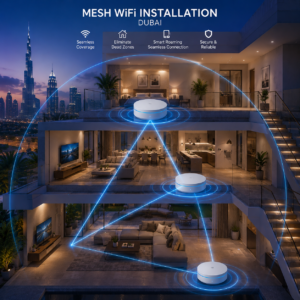
RepairZone supplies, installs, and configures mesh WiFi systems across Dubai. Our technicians conduct a proper site assessment, recommend the right system and number of nodes for your property, position each node based on signal data — not guesswork — and test coverage in every room before leaving.
Why Does My WiFi Fail Through Concrete Walls in Dubai Properties?
Dubai villa and apartment construction uses dense reinforced concrete between floors and walls. This material absorbs and blocks wireless signals far more effectively than the timber-framed construction common in Europe and North America. Standard indoor routers — regardless of brand or price — cannot penetrate multiple concrete floors and deliver usable signal across an entire property.
The practical result: a router on the ground floor of a typical Dubai villa loses 15–20 dB of signal strength per concrete floor slab. By the time the signal reaches the top floor, it has degraded from a fast, reliable connection into an unstable trickle — barely enough to load a web page, let alone stream video or take a video call.
A correctly installed mesh WiFi system solves this by placing a coverage node on each floor. The private connection between nodes maintains full speed between them, so every node delivers the router’s full performance — not a fraction of it degraded through concrete. The result is consistent signal in every room, on every floor, and in outdoor areas.
How to Prepare for Your Mesh WiFi Installation
Getting the most from your installation starts before our technician arrives. Here is what to have ready:
- Your ISP router login details — the username and password printed on your Etisalat (e&) or du router label. Our technician needs these to connect the mesh system correctly.
- Your preferred network name and password — we set up your new network name (SSID — the name that appears when you search for WiFi) and password during installation. Have these ready if you want specific credentials.
- A rough floor plan or walk-through — knowing which rooms have the weakest signal helps our technician prioritise during the signal scan. A quick walk-through on arrival is sufficient.
- Access to all floors and outdoor areas — our technician needs to scan and test signal in every area, including gardens, pool areas, and terraces.
- Existing Ethernet ports noted — if your property has Ethernet ports in multiple rooms (common in newer JVC townhouses and some Dubai Hills villas), let our technician know. These can be used for wired node connections that significantly improve performance.
No other preparation is needed. We bring all tools and, if supplying hardware, all mesh nodes and cables required for the installation.
What Does Mesh WiFi Installation in Dubai Include?
Pre-Installation
- Property Assessment & Site Survey — We assess your floor plan, wall density, and outdoor coverage requirements before recommending the right mesh system and node count. Every installation starts with a proper signal scan, not a phone estimate.
- Hardware Supply — We supply mesh WiFi systems from Google, TP-Link, Eero, and Netgear. If you have already purchased a system, we install and configure it. We advise on the best system for your property and budget before any purchase.
- Node Placement Planning — Each node position is determined by signal data specific to your property. Dense concrete floors and walls require precise placement to maintain a strong connection between nodes.
Installation and Configuration
- Full System Configuration — Network name (SSID — the name that appears when you search for WiFi), password, WPA3 (the current wireless security standard — keeps unauthorised devices off your network) encryption, band steering, and seamless roaming configured across all nodes.
- Node-to-Node Connection Optimisation — We configure the private connection between nodes to maximise throughput between floors — the most critical and most commonly missed step in any mesh installation.
- Fast Roaming Setup — We configure fast roaming so devices switch seamlessly between nodes without dropping calls or connections as you move through the property. The technical standard (802.11r) is enabled where supported by your hardware.
- Smart Home & IoT Device Integration — IoT (Internet of Things — smart home devices such as cameras, doorbells, thermostats, and voice assistants) devices are connected to the correct network segment to ensure reliable operation and network security.
- Guest Network Configuration — An isolated guest SSID (separate network name) for short-term rental properties, home offices, and offices — giving visitors internet access without exposing your main network.
- VLAN Segmentation where required — VLAN (Virtual Local Area Network — a way to separate different types of network traffic on the same physical infrastructure) separation for offices and smart homes requiring IoT isolation from personal devices.
Post-Installation
- Room-by-Room Coverage Testing — We test signal strength and speeds in every room, on every floor, and in outdoor areas before the installation is signed off. You see the actual speed results in each location before we leave.
- Existing Network Integration — Mesh WiFi connects to your existing Etisalat (e&) or du router or modem. No ISP changes or new connections required.
- Staff Handover — Network credentials, guest SSID details, and basic app walkthrough provided. You leave knowing how to manage your network.
Which Mesh WiFi System Is Best for Your Dubai Property?
| System | Best For | WiFi Standard | Coverage Per Node | RepairZone Verdict |
|---|---|---|---|---|
| Google Nest WiFi Pro | 3–5 bedroom Dubai villas | WiFi 6 | ~185 sqm | Best roaming performance for most villa layouts |
| TP-Link Deco XE75 Pro | Large villas and apartments needing WiFi 6E | WiFi 6E (tri-band) | ~230 sqm | Best value WiFi 6E — widely available at Sharaf DG |
| TP-Link Deco X55 / M4 | Dubai Marina and JVC apartments | WiFi 6 / WiFi 5 | ~185 sqm | Most affordable reliable mesh for apartments |
| Eero Pro 6E | Smart home-heavy villas, Arabian Ranches, Dubai Hills | WiFi 6E (tri-band) | ~185 sqm | Exceptional IoT device handling and low latency roaming |
| Netgear Orbi 960 | Palm Jumeirah frond villas, 6+ bedroom properties | WiFi 6E (quad-band) | ~280 sqm | Highest throughput — best for maximum performance across large properties |
All systems listed are available in UAE retail (Sharaf DG, Jumbo Electronics, Amazon.ae) and are TDRA-approved for use in Dubai. We install and configure all of them — and advise on the right choice for your specific property before any purchase.
Mesh WiFi Installation Dubai – Property Types
Villa Whole-Home Wireless Setup in Dubai
Dubai villas in Arabian Ranches, Dubai Hills, Palm Jumeirah, The Springs, Damac Hills, Mudon, and JVC are the most common property type requiring professional mesh WiFi installation in Dubai. Most span two to three floors with thick reinforced concrete between levels and large outdoor areas that no single router can cover.
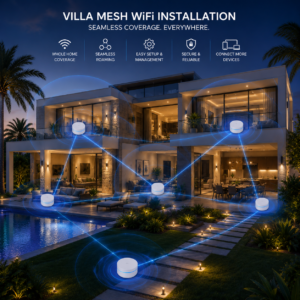
Professional villa smart network configuration approach:
- Site assessment and floor plan review to determine exact node count and placement positions based on signal data
- Primary node connected to existing router on ground or first floor
- Secondary node on upper floor positioned for maximum cross-floor node-to-node signal
- Third node near garden or pool area for outdoor coverage where required
- Speed and signal testing in all rooms, stairwells, and outdoor zones before completion
⭐ Verified Google Review — Damac Hills 2 Villa
“We recently used RepairZone for a professional WiFi installation in Damac Hills 2. We upgraded to a Google Nest WiFi Pro mesh system with 4 nodes for our 4-bedroom villa. The technician carried out a detailed site assessment, positioned each node strategically, and ensured seamless WiFi coverage throughout the villa. Internet speed, stability, and coverage have improved significantly, with zero dead zones.” — Google Review, RepairZone
Apartment Mesh WiFi Installation in Dubai — Fixing Dead Zones and Interference
Larger apartments in Dubai Marina, JLT, Business Bay, and JVC face two distinct challenges: distance from the router to far rooms causes signal weakening through concrete walls, and interference from dozens of neighbouring networks on the same channel degrades connection quality even where signal appears strong.
A single mesh node added at the optimal mid-point position resolves the coverage gap. Channel optimisation — scanning all visible neighbouring networks and assigning the least congested channel to your router — resolves the interference problem separately. Both steps are included in every apartment installation.
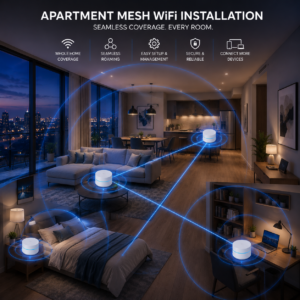
Apartment mesh WiFi installation includes:
- Signal scan to identify exact dead zones and weak areas in every room
- Single node placed at the optimal mid-point position for maximum coverage reach
- Channel scan of all neighbouring networks and assignment of the least congested channel
- 5 GHz band steering — directing capable devices to the faster, less congested band
- Coverage verification in all rooms including bathrooms and balconies before leaving
Office & Small Business Mesh WiFi Installation in Dubai
For small offices and co-working spaces in Business Bay, DIFC, JLT, and Sheikh Zayed Road without existing structured cabling, a business-grade mesh system provides whole-office wireless coverage without the cost of running Ethernet to each access point.
Physical setup — node placement for even coverage across all work areas and meeting rooms — is handled first. Network configuration is handled separately: guest network isolation from the internal staff network, QoS (Quality of Service — rules that prioritise video calls and VoIP over general browsing) for Microsoft Teams and Zoom, and VLAN segmentation for offices handling sensitive data.
Office mesh WiFi installation includes:
- Assessment of office size, desk layout, and concurrent device count
- Node placement for even coverage across all work areas and meeting rooms
- Guest network setup isolated from internal staff network
- QoS configuration prioritising Microsoft Teams, Zoom, and VoIP traffic
- WPA3 encryption and VLAN segmentation for offices handling sensitive business data
Short-Term Rental & Airbnb Mesh WiFi Installation in Dubai
Dubai’s short-term rental market — particularly in Dubai Marina, Downtown Dubai, and Palm Jumeirah — requires reliable full-property WiFi coverage with easy guest access and complete separation from the host’s personal network. A mesh system with a configured guest SSID is the ideal solution — guests connect to a simple, visible guest network without any access to your management devices or personal data.
Mesh WiFi vs WiFi Extender — Which Delivers Optimised Performance in Dubai?
| Feature | WiFi Extender / Booster | Mesh WiFi System |
|---|---|---|
| Speed at extended location | Up to 50% reduction — cuts your speed in half | Near-full speed maintained |
| Network name | Separate SSID — manual switching required | Single SSID — seamless roaming |
| Device roaming | Manual — device stays on weakest signal | Automatic — connects to nearest node |
| Interference impact | Worsens channel congestion in high-density buildings | Private node-to-node connection — minimal impact |
| Performance in concrete Dubai villas | Poor — signal weakens through concrete floors | Confirmed effectiveness — node on each floor |
| Smart home device support | Limited | Full — IoT VLAN and guest network supported |
| Scalability | Limited | Add nodes as property requires |
| Recommended for Dubai villas | ❌ Not recommended for high-density environments | ✅ Optimised performance for Dubai properties |
How Many Mesh Nodes Are Right for Your Dubai Home?
| Property Type | Typical Node Count | Coverage |
|---|---|---|
| 1–2 bedroom apartment | 1 node | Full apartment including far bedrooms and balcony |
| 3 bedroom apartment (large) | 1–2 nodes | All rooms including far bedrooms and balcony |
| 2 bedroom, 2 floor villa | 2 nodes | Both floors |
| 3 bedroom, 2 floor villa with garden | 2–3 nodes | All floors + outdoor area |
| 4 bedroom villa in Arabian Ranches (~4,000 sqft) | 3–4 nodes | All floors + pool + garden — achieves up to 1 Gbps wireless speeds depending on ISP plan |
| 4–5 bedroom, 3 floor villa | 3–4 nodes | All floors + outdoor + pool area |
| Large Palm Jumeirah frond villa (6+ bedrooms) | 4–5 nodes | Full property + all outdoor zones |
| Small office (up to 20 staff) | 2–3 nodes | Full office floor + meeting rooms |
Node counts are indicative — exact requirements depend on your property’s layout, wall density, and outdoor coverage needed. Our technicians confirm the exact node count during the on-site signal survey before any hardware is purchased.
Professional Mesh WiFi Installation vs DIY — What Is the Real Difference?
Many Dubai residents purchase a mesh system and attempt self-installation, only to find coverage gaps remain, nodes are positioned where the nearest power outlet is rather than where signal data indicates, and the connection between nodes is not optimised. The result is a system that performs well below its rated capability.
Professional whole-home wireless setup delivers better results because:
- Signal survey first — A professional identifies the exact signal pattern in your specific property before placing any node — based on precise signal measurements, not estimates
- Node-to-node connection optimisation — The connection between nodes is configured for maximum throughput between floors — the most commonly missed step in DIY installations
- Concrete wall assessment — Our technicians know where Dubai’s dense concrete causes the most signal weakening and position nodes to compensate
- Before and after testing — Speed and coverage tested in every room so you see the measurable improvement before we leave
- Full installation warranty — We stand by our work with a full installation warranty, ensuring your network stays optimised. If any issue arises from our installation, we return and resolve it at no additional cost
Eliminating Signal Dead Spots Across Dubai — Area Guide
Arabian Ranches, Dubai Hills & The Springs
The most common areas for whole-home wireless setup requests in Dubai. Three-floor villas with large gardens are the norm — a 3–4 node system covers most layouts completely. A 4,000 sqft villa in Arabian Ranches typically requires 3 nodes: ground floor, first floor, and one near the garden or pool area — achieving reliable speeds up to 1 Gbps throughout depending on the ISP plan subscribed.
Palm Jumeirah
Frond villas are among the largest residential properties in Dubai, requiring 4–5 nodes for full property coverage including pool areas, terraces, and beach access. Netgear Orbi 960 is our recommended system for Palm Jumeirah frond villa installations due to its dedicated quad-band node-to-node connection performance.
Damac Hills, Mudon & Akoya
Large villa plots with outdoor entertaining areas. 3-node systems with outdoor node positioning cover most Damac Hills layouts — as confirmed by our Damac Hills 2 customer review above.
Dubai Marina & JLT
Larger apartments occasionally require a single mesh node for far bedroom coverage. Channel optimisation is always included to combat interference from neighbouring networks in these high-density communities. A single TP-Link Deco X55 or Eero node is the most affordable and practical solution for most Dubai Marina apartment tenants.
Jumeirah Village Circle (JVC) & JVT
JVC townhouses frequently have pre-installed Ethernet conduit — making wired access point setups possible. Where cabling is not available, 2–3 node mesh WiFi installation covers most JVC townhouse and villa layouts completely.
Business Bay, DIFC & Downtown Dubai
Small business and office smart network configuration in Business Bay for teams of up to 20–30 users. Enterprise mesh options available for offices requiring VLAN segmentation and guest network isolation.
Mirdif, Al Barsha & Al Nahda
Older villa stock with denser walls than newer builds. Mesh node placement near doorways and open corridors maximises signal penetration between rooms — wired node-to-node connections used where older Ethernet cabling exists.
Mesh WiFi Installation Cost in Dubai
All prices below are installation service costs only. Hardware (mesh nodes) is additional — we advise on the right system for your budget before any purchase.
| Service | Installation Cost (AED) | What’s Included |
|---|---|---|
| Single node installation (apartment) | AED 350 – 400 | Signal survey, node placement, full configuration, coverage test |
| 2-node mesh WiFi installation | AED 550 – 750 | Dual node placement, node-to-node optimisation, roaming setup, coverage verification |
| 3-node villa whole-home setup | AED 800 – 1,000 | Multi-floor placement, outdoor node, node-to-node optimisation, full testing |
| 4-node large villa installation | AED 1,200 – 1,600 | Full villa + outdoor coverage, all floors tested, warranty included |
| 5+ node Palm Jumeirah / large villa | AED 1,700 – 3,000 | Full coverage assessment, installation, node-to-node optimisation, complete testing |
| Office mesh WiFi installation | AED 700 – 1,800 | Signal survey, node placement, guest network, QoS, VLAN security config, testing |
Why Choose RepairZone for Mesh WiFi Installation in Dubai
- We Supply and Install — We stock Google Nest WiFi Pro, TP-Link Deco, Eero Pro, and Netgear Orbi. One visit covers supply, installation, and full configuration. Compatible with Etisalat (e&), du, and all UAE ISPs.
- Signal Survey Every Time — Every installation starts with a signal scan and layout assessment. Node positions are determined by signal data based on precise measurements — not estimates.
- 10+ Years of Network Experience in Dubai — We know which mesh systems perform best in which Dubai property types and advise on the right system before you purchase anything.
- Expert Recommendations Tailored to Your Property — We provide expert recommendations based on your property’s specific architecture — wall materials, floor count, outdoor areas, and device count all factor into our recommendation.
- Verified Google Reviews from Real Customers — Real Dubai residents describing real results from their installations — not generic testimonials.
- Same-Day Service Guaranteed — Technicians reach most Dubai locations within 30–60 minutes.
- Full Installation Warranty — We stand by our work. If any issue arises from our installation, we return and resolve it at no additional charge.
Mesh WiFi Installation Dubai — Frequently Asked Questions
Q: What is mesh WiFi installation and why do I need it in Dubai?
Ans: Mesh WiFi installation places multiple interconnected nodes throughout your property to create one seamless wireless network. In Dubai, thick reinforced concrete walls and multi-floor villa layouts make standard single-router setups insufficient for full coverage. A professionally installed mesh system places a node on each floor, eliminating dead zones and delivering consistent speeds everywhere. Learn more about how mesh networks work.
Q: How is mesh WiFi different from a WiFi extender or booster?
Ans: A WiFi extender creates a separate network name, cuts your internet speed in half, and cannot automatically roam devices to the strongest signal. A mesh system maintains a single network name, full speed through a private connection between nodes, and seamless automatic device roaming. For Dubai villas and larger apartments, professional mesh WiFi installation delivers confirmed, optimised performance that extenders cannot match.
Q: Do you supply the mesh hardware or do I need to buy it myself?
Ans: We supply mesh WiFi systems from Google, TP-Link, Eero, and Netgear — all TDRA-approved for use in the UAE. If you have already purchased a system, we install and configure it. We advise on the best system for your property before any purchase so you don’t buy hardware unsuitable for your layout.
Q: How many mesh nodes do I need for my Dubai villa?
Ans: Most 3-bedroom, 2-floor Dubai villas require 2–3 nodes. A 4-bedroom villa in Arabian Ranches of approximately 4,000 sqft typically requires 3–4 nodes — one per floor plus outdoor coverage. Our technicians confirm the exact count during the on-site signal survey before installation begins.
Q: Why hire a professional for mesh WiFi installation in Dubai?
Ans: Professional installation delivers better coverage than DIY because it starts with a proper signal survey, optimises the node-to-node connection — the most commonly missed step — and positions nodes based on precise signal measurements from your specific property. We test every room before leaving so you see the result before we sign off.
Q: How long does mesh WiFi installation take in Dubai homes and offices?
Ans: A 2-node apartment installation takes approximately 45–60 minutes. A 3-node villa installation with outdoor coverage takes 1.5–2.5 hours. Our technicians complete most installations within 3 hours. Larger properties with 4+ nodes are typically completed within 3 hours. Office installations are scoped during the site survey.
Q: What pre-installation checks do you carry out?
Ans: Our technician reviews your floor plan, assesses wall density and construction type, identifies optimal node placement positions based on signal data, checks your existing router and modem setup, and confirms whether existing Ethernet points can be used for wired node connections. This pre-installation survey ensures accurate recommendations and avoids surprises on installation day.
Q: Which mesh system is best — Google Nest WiFi Pro vs Netgear Orbi?
Ans: Google Nest WiFi Pro is our recommended system for most 3–5 bedroom Dubai villas — excellent roaming performance, WiFi 6, and a clean setup process. Netgear Orbi 960’s dedicated quad-band node-to-node connection delivers better throughput for larger properties like Palm Jumeirah frond villas where maximum performance across all floors is the priority. For Dubai Marina apartments, a single TP-Link Deco X55 node is typically the most affordable and practical solution. We provide expert recommendations tailored to your property’s architecture before any purchase.
Q: Can you add nodes to my existing mesh system?
Ans: Yes, in most cases. If your existing system supports additional nodes of the same brand and generation, we add nodes and reconfigure for full coverage. We advise on compatibility during the site assessment before any purchase.
Q: Does mesh WiFi installation work with my existing router?
Ans: Yes. Mesh systems connect to your existing Etisalat (e&) or du router or modem. No ISP changes or new connections are required — we integrate the mesh system into your existing setup on the same visit.
Q: Can you set up advanced security features during mesh WiFi installation?
Ans: Yes. Security configuration is part of every installation — WPA3 encryption (the current wireless security standard), strong unique password, guest network isolation, and IoT device separation onto a dedicated network segment. For home offices and small businesses, we also configure VLAN segmentation to separate staff and visitor traffic. Learn more about WPA3 security standards from the Wi-Fi Alliance.
Q: Do you provide mesh WiFi installation for small cafés and restaurants in Dubai?
Ans: Yes. For a small café of 30–50 seats in Dubai, we install and configure a mesh system covering the full dining area and kitchen, with a customer-facing guest SSID and a separate staff network. We provide a quote based on your specific layout and seat count.
Q: Is your mesh WiFi installation compatible with Etisalat and du connections?
Ans: Yes. Our mesh WiFi installations are fully compatible with Etisalat (e&) eLife and du home and business broadband connections, as well as all other UAE ISPs. No ISP changes or additional subscriptions are required.
Get Your Mesh WiFi Installed Today
If you have dead zones, weak signal on upper floors, or no WiFi coverage outdoors — RepairZone assesses, supplies, and installs the right whole-home wireless setup the same day. Contact us to book a same-day appointment across all Dubai areas.
📍 Mesh WiFi Installation Service Areas in Dubai
We provide same-day mesh WiFi installation services across all Dubai communities including:
- Dubai Marina
- JLT (Jumeirah Lake Towers)
- Downtown Dubai
- Business Bay
- Al Barsha
- Jumeirah
- Palm Jumeirah
- Arabian Ranches
- Dubai Hills
- Mirdif
- Silicon Oasis
- Damac Hills
- Mudon
- Akoya
- Motor City
- Sports City
- Dubai South
- Al Furjan
- Jumeirah Village Circle (JVC)
- Jumeirah Village Triangle (JVT)
- The Greens
- The Springs
- The Meadows
- Discovery Gardens
- Al Nahda
- Al Qusais
- Deira
- Bur Dubai
- Karama
- Al Wasl
- Umm Suqeim
- Jebel Ali
- International City
🚚 Our technicians reach your location within 30–60 minutes anywhere in Dubai.
📍 Visit Our Service Center
RepairZone – Head Office
Aspin Commercial Tower,
Sheikh Zayed Road,
Trade Centre 1, Dubai
If you’re searching for mesh WiFi installation Dubai, whole-home wireless setup Dubai, Google Nest WiFi installation Dubai, or TP-Link Deco installation Dubai, RepairZone is your trusted expert for fast, reliable, and professional network deployment. We also provide WiFi range extension in Dubai and WiFi optimisation in Dubai.