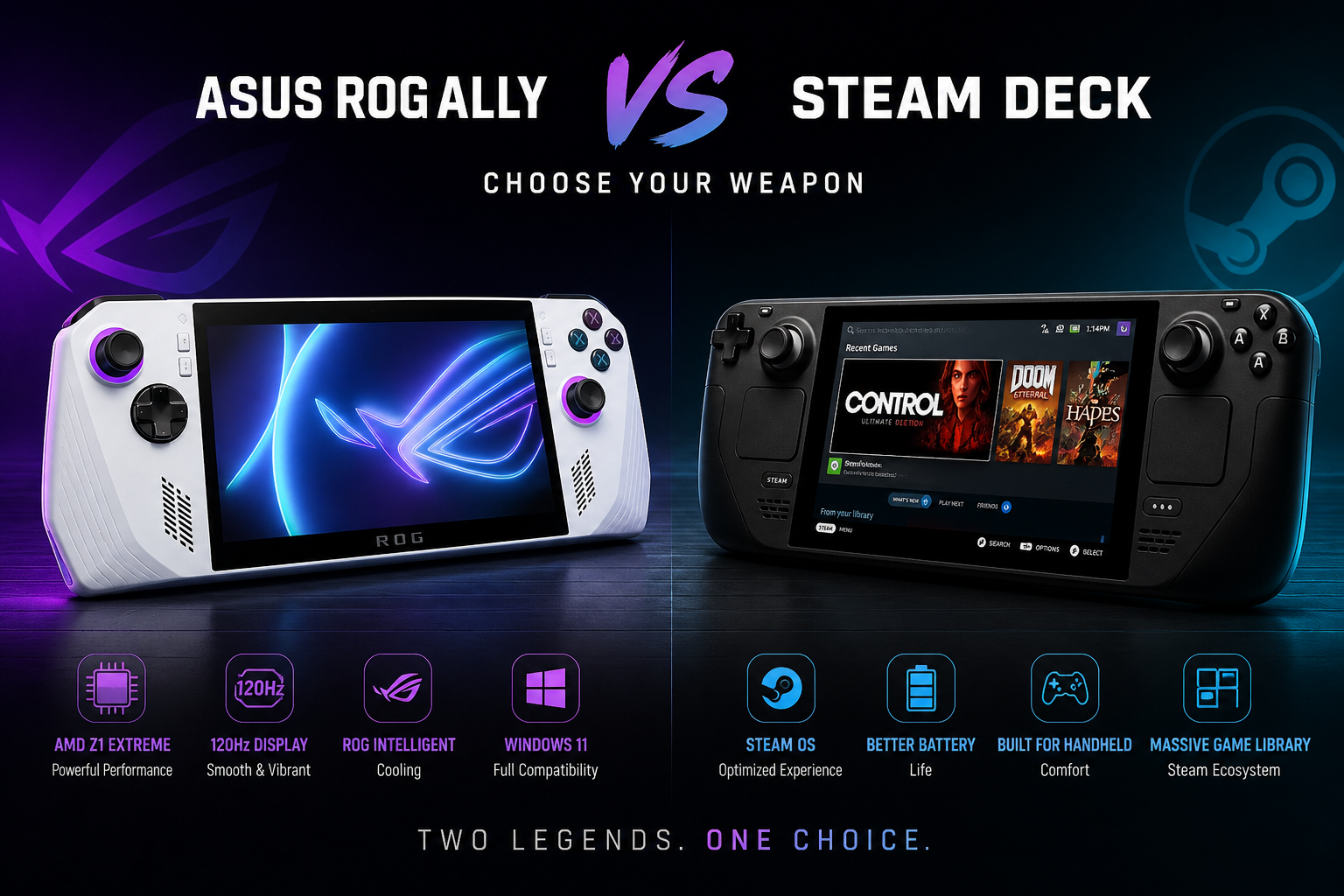
Asus ROG Ally vs Steam Deck — Which is Better for Gamers in 2026?
The handheld gaming PC market has exploded. Two devices dominate the conversation — the Asus ROG Ally and the Valve Steam Deck. Both are powerful, portable gaming machines that let you play PC games anywhere. But they take very different approaches, and choosing the wrong one is an expensive mistake.
In this comparison we break down everything — performance, display, battery life, game library, repairability, and value — so you can make the right decision for how you actually game.
Asus ROG Ally vs Steam Deck — Quick Overview
The Asus ROG Ally runs Windows 11 and is powered by AMD’s Ryzen Z1 Extreme processor — hardware purpose-built for handheld gaming. It launched in 2023 and was updated with the ROG Ally X in 2024, which brought a larger battery and improved thermals.
Asus ROG Ally vs Steam Deck
The Valve Steam Deck runs SteamOS, Valve’s custom Linux-based operating system, and launched in 2022. The Steam Deck OLED arrived in late 2023, bringing a stunning new display and improved battery life. Despite being built on Linux, the Steam Deck plays the vast majority of Steam’s library seamlessly through Proton compatibility.
Both devices target the same audience — PC gamers who want to play away from a desk. But they serve that audience in very different ways.
Performance — Asus ROG Ally vs Steam Deck
The Asus ROG Ally wins on raw performance. The AMD Ryzen Z1 Extreme chip inside the ROG Ally outperforms the Steam Deck’s custom AMD APU across almost every benchmark. In practice this means higher frame rates, better performance at higher graphics settings, and the ability to run newer, more demanding games.
The ROG Ally also supports a 120Hz display refresh rate compared to the Steam Deck’s 60Hz (LCD) or 90Hz (OLED). For fast-paced games — shooters, fighting games, action titles — this difference is noticeable.
The Steam Deck is no slouch though. For its target library of indie games, older titles, and mid-range PC games, the Steam Deck’s performance is more than sufficient. Valve has also done an excellent job optimising SteamOS to squeeze maximum performance from the hardware.
Winner: Asus ROG Ally — for demanding modern games.
Steam Deck — for its target library at optimised settings.
Display — Asus ROG Ally vs Steam Deck
This is where the comparison gets interesting.
The Asus ROG Ally features a 7-inch FHD (1920×1080) IPS display with a 120Hz refresh rate. It’s sharp, smooth, and excellent for fast-paced gaming. The high refresh rate is a genuine advantage for competitive titles.
The Steam Deck LCD has a 7-inch 1280×800 display at 60Hz — noticeably lower resolution and refresh rate than the ROG Ally. However, the Steam Deck OLED is a different story entirely. Its 7.4-inch OLED panel with HDR, 90Hz refresh rate, and dramatically improved contrast and colour accuracy is widely considered one of the best displays ever put in a handheld gaming device.
If display quality is your priority and you’re choosing the Steam Deck OLED, it competes very seriously with the ROG Ally despite the lower resolution — OLED’s black levels and colour vibrancy compensate in ways resolution alone doesn’t capture.
Winner: ROG Ally for resolution and refresh rate. Steam Deck OLED for overall display quality and visual experience.
Battery Life — Asus ROG Ally vs Steam Deck
Battery life is one of the most important factors for a handheld gaming device — and it’s where both devices have faced criticism.
The original Asus ROG Ally was widely criticised for poor battery life, often lasting just 1.5 to 2 hours under heavy gaming loads. Asus addressed this with the ROG Ally X, which features a significantly larger 80Wh battery, pushing real-world gaming time to 3–4 hours depending on settings and game demands.
The Steam Deck LCD offered around 2–4 hours depending on the game. The Steam Deck OLED improved this substantially — most users report 4–6 hours of real-world gaming, making it the clear battery life winner among current handheld gaming PCs.
If you game away from power outlets regularly — on flights, commutes, or long sessions without a charger nearby — the Steam Deck OLED’s battery advantage is significant.
Winner: Steam Deck OLED — by a clear margin.
Game Library — Asus ROG Ally vs Steam Deck
This is perhaps the most important practical difference between the two devices.
The Asus ROG Ally runs Windows 11, which means it can run almost every PC game ever made — Steam, Epic Games Store, Xbox Game Pass, GOG, Ubisoft Connect, and any other PC game launcher all work natively. If you have an existing PC game library across multiple platforms, the ROG Ally accesses all of it without compromise.
The Steam Deck runs SteamOS and is primarily designed for Steam games. Through Valve’s Proton compatibility layer, a large percentage of Steam’s library works well — Valve maintains a “Verified” and “Playable” ratings system to help users know what to expect. However, games with aggressive anti-cheat software (particularly online multiplayer titles) often don’t work on Steam Deck, and non-Steam launchers require manual setup.
For Steam-heavy gamers, the Steam Deck’s library coverage is excellent. For gamers with cross-platform libraries or who specifically want Game Pass or Epic exclusives without workarounds, the ROG Ally wins decisively.
Winner: Asus ROG Ally — for full PC game library compatibility.
Steam Deck — for Steam-focused gamers who value the curated experience.
Software & User Experience — Asus ROG Ally vs Steam Deck
The Steam Deck’s SteamOS is widely praised as a polished, controller-optimised experience. Everything is designed for handheld use — the interface works perfectly with thumbsticks, the Steam overlay is excellent, and the overall experience feels purpose-built for the form factor. For users who want to pick up and play without configuration, the Steam Deck delivers.
The ROG Ally runs Windows 11, managed through Asus’s ROG Armoury Crate software. Windows was not designed for a handheld controller-only interface and this shows — navigating Windows menus and launchers with thumbsticks requires adjustment, and some tasks benefit from connecting a mouse or keyboard. Asus has improved Armoury Crate significantly but the Windows handheld experience still trails SteamOS for ease of use.
That said, Windows gives the ROG Ally flexibility the Steam Deck simply can’t match — full desktop PC functionality, browser use, creative apps, and access to any software.
Winner: Steam Deck — for ease of use and pick-up-and-play experience.
ROG Ally — for flexibility and full PC functionality.
Build Quality & Design — Asus ROG Ally vs Steam Deck
The Asus ROG Ally is lighter and more compact than the Steam Deck, with a premium feel that reflects its higher price point. Its white colourway and RGB accents give it a distinctly gaming-forward aesthetic. The ROG Ally X improved the build further with better grip texture and a more solid overall feel.
The Steam Deck is larger and heavier — particularly noticeable for users with smaller hands or during very long sessions. However, many users find its ergonomics comfortable for extended play, and the trackpads and back grip buttons give it more input options than most competing handhelds.
The Steam Deck OLED shimmed down the weight slightly compared to the original LCD model. Both devices feel solidly built, though the ROG Ally’s lighter chassis is a practical advantage for portable use.
Winner: ROG Ally — lighter, more portable, premium build.
Steam Deck — better ergonomics and more input options for long sessions.
Repairability — Asus ROG Ally vs Steam Deck
This is a factor most buyers overlook — but it matters a lot for long-term ownership.
The Steam Deck was designed with repairability in mind. Valve partnered with iFixit to offer official replacement parts and repair guides. The Steam Deck earned high repairability scores and replacement components — screens, batteries, joysticks — are widely available at reasonable cost. Valve even sells parts directly.
The Asus ROG Ally is repairable but less open. Parts are available through third-party repair specialists and repair costs are broadly similar to the Steam Deck for common faults like screen replacement and battery replacement. The ROG Ally X’s larger battery is not user-replaceable.
Both devices are absolutely worth repairing rather than replacing when common faults occur — joystick drift, battery degradation, and screen damage are all straightforward repairs that cost a fraction of the device’s replacement value.
Common repairs for both devices include:
– Screen / LCD replacement
– Joystick drift repair
– Battery replacement
– Charging port repair
– Cooling system service
– SSD upgrade (up to 2TB)
Winner: Steam Deck — more open repair ecosystem and official parts availability.
Both devices: repairable and worth fixing vs replacing.
Price — Asus ROG Ally vs Steam Deck
The Asus ROG Ally is the more expensive device. The base ROG Ally (Ryzen Z1) sits at a lower price point but the performance-focused ROG Ally (Ryzen Z1 Extreme) and ROG Ally X carry a significant premium.
The Steam Deck LCD starts at a lower price than any ROG Ally configuration, making it the most accessible handheld gaming PC on the market. The Steam Deck OLED sits between the base and premium ROG Ally price points while offering a superior display and better battery life than the original LCD model.
For budget-conscious gamers, the Steam Deck LCD remains the best value handheld gaming PC available. For gamers who want maximum performance and Windows flexibility and are willing to pay for it, the ROG Ally Extreme justifies its premium.
Winner: Steam Deck LCD — best value. ROG Ally — best performance per pound for Windows gaming.
Asus ROG Ally vs Steam Deck — Head to Head Summary
Which Should You Buy — Asus ROG Ally or Steam Deck?
Buy the Asus ROG Ally if:
– You want maximum performance for demanding modern games
– You have an existing game library across Steam, Epic, Xbox Game Pass, or other launchers
– You want full Windows PC functionality in a handheld form factor
– Fast games at high refresh rates matter to you
– You prioritise a lighter, more compact device
Buy the Steam Deck if:
– You primarily game on Steam and have an existing Steam library
– Battery life is a top priority — especially the OLED model
– You value a polished, pick-up-and-play experience over flexibility
– Budget is a consideration — the LCD model offers outstanding value
– Long gaming sessions are common and you want comfortable ergonomics
– Repairability and long-term ownership matter to you
Buy the Steam Deck OLED if:
– You want the best display in any handheld gaming device currently available
– Battery life is your biggest concern
– You’re a Steam-focused gamer willing to pay a mid-range premium
– You want the best overall handheld gaming experience regardless of raw performance
Frequently Asked Questions — ROG Ally vs Steam Deck
Is the Asus ROG Ally more powerful than the Steam Deck?
Yes. The ROG Ally’s AMD Ryzen Z1 Extreme processor significantly outperforms the Steam Deck’s custom AMD APU in benchmark tests and real-world gaming. The ROG Ally runs demanding modern games at higher settings and frame rates than the Steam Deck.
Can the Steam Deck run the same games as the ROG Ally?
Not all of them. The ROG Ally runs Windows and can access every PC game launcher — Steam, Epic, Xbox Game Pass, and more. The Steam Deck runs SteamOS and plays most Steam games well through Proton compatibility, but games with certain anti-cheat systems and non-Steam launchers require workarounds or don’t work at all.
Which has better battery life — ROG Ally or Steam Deck?
The Steam Deck OLED has significantly better battery life — typically 4–6 hours of real-world gaming versus 1.5–2 hours for the original ROG Ally. The ROG Ally X improved this considerably with its larger battery, reaching 3–4 hours, but the Steam Deck OLED still leads.
Which is easier to repair — ROG Ally or Steam Deck?
The Steam Deck has a more open repair ecosystem — Valve partnered with iFixit and sells official replacement parts directly. Both devices are repairable by specialist technicians, and common faults like joystick drift, screen damage, and battery degradation are worth repairing on both rather than replacing the whole device.
Is it worth repairing an ROG Ally or Steam Deck instead of buying new?
Yes — in almost every case. Most common repairs cost between AED 150 and AED 600. A replacement device costs AED 2,000 or more. Repairing your existing device is significantly more cost-effective and environmentally responsible.
Both the Asus ROG Ally and Steam Deck are excellent handheld gaming PCs — the right choice comes down to how you game, what library you’re invested in, and what you value most in a portable device. For raw power and Windows flexibility, the ROG Ally leads. For battery life, display quality, value, and a seamless Steam experience, the Steam Deck — especially the OLED — is hard to beat.
If your ROG Ally or Steam Deck needs a repair — screen replacement, joystick drift fix, battery replacement, or SSD upgrade — RepairZone provides professional handheld gaming PC repair with free pickup and delivery, free diagnosis, and a 12-month warranty on every repair.
We use cookies to ensure that we give you the best experience on our website. If you continue to use this site we will assume that you are happy with it.