Last Updated: July 2026
The PlayStation 5 (PS5) delivers outstanding gaming performance, but like any frequently used gaming console, it can develop hardware issues over time. One of the most common problems is a damaged HDMI port, which may cause a No Signal message, black screen, flickering display or intermittent video output. While some display issues are caused by external accessories or software settings, physical damage to the HDMI connector remains one of the most frequent hardware repairs performed on PlayStation 5 consoles.
This guide explains the common causes of PS5 HDMI port problems, how to recognise the symptoms, when professional repair is recommended and what the HDMI replacement process involves. Whether you’re troubleshooting the issue yourself or considering professional repair, understanding the cause is the first step towards restoring your PlayStation 5.
Need Professional PS5 HDMI Port Replacement?
If your PlayStation 5 has a physically damaged HDMI connector, bent pins, black screen or a persistent No Signal error, our PS5 HDMI Port Replacement Dubai service includes free diagnosis, same-day repair for most cases, free pickup & delivery across Dubai and a 3-month repair warranty.
What Causes PS5 HDMI Port Problems?
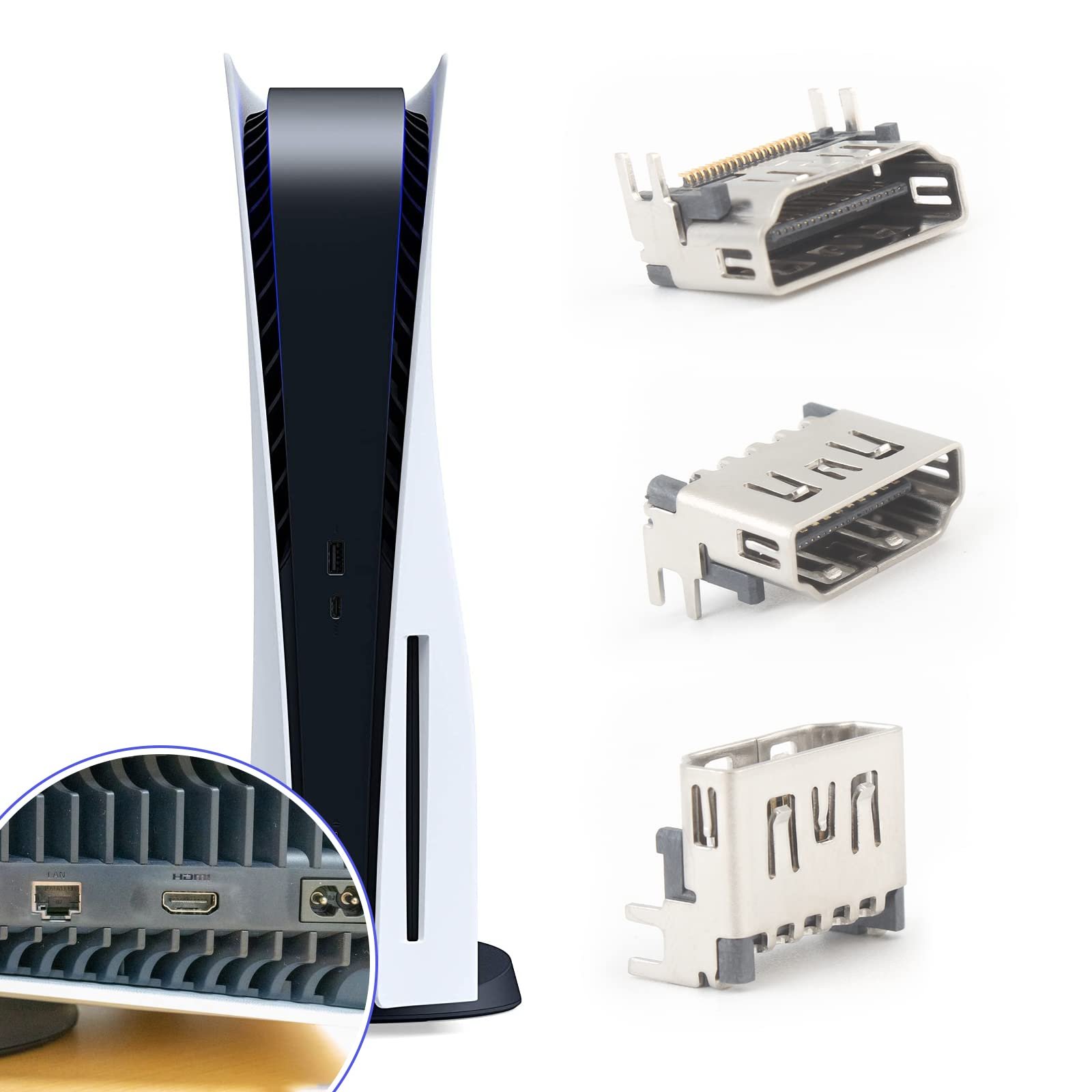
The HDMI port is responsible for transmitting high-definition video and audio signals from your PlayStation 5 to your television or monitor. Because the connector is frequently used and exposed to physical movement, it can gradually become damaged through everyday use or accidental impact. In some cases the HDMI connector itself fails, while in others the motherboard circuitry connected to the port may also be affected.
Understanding the cause of the problem helps determine whether the console requires HDMI connector replacement, motherboard repair or a simpler solution such as replacing a faulty HDMI cable.
| Common Cause | Possible Result |
|---|
| Frequent plugging and unplugging of HDMI cables | Loose connector or worn internal pins. |
| Console accidentally falls while connected | Broken HDMI port or motherboard damage. |
| Forcing the HDMI cable into the port | Bent HDMI pins and poor signal transmission. |
| Dust or debris inside the HDMI connector | Poor electrical contact and intermittent display. |
| Electrical surge or previous incorrect repair | Damage to motherboard components or HDMI circuitry. |
Common Symptoms of a Faulty PS5 HDMI Port
Although a damaged HDMI connector is one of the most common causes of display problems, several different faults can produce similar symptoms. Before assuming the HDMI port requires replacement, it’s important to identify how the console behaves.
| Symptom | Possible Cause |
|---|
| No Signal | Damaged HDMI connector, motherboard fault or faulty HDMI cable. |
| Black Screen | HDMI encoder IC, damaged connector or display configuration. |
| Flickering Display | Loose HDMI connection or damaged internal pins. |
| Loose HDMI Cable | Physically worn HDMI connector. |
| Visible Bent Pins | HDMI connector replacement is usually required. |
💡 Important
Not every “No Signal” problem is caused by a damaged HDMI port. Display settings, faulty HDMI cables, HDMI encoder IC failures and motherboard faults can produce similar symptoms. Professional diagnosis helps identify the correct repair before replacing any components.
Can You Repair a PS5 HDMI Port Yourself?
Replacing a PlayStation 5 HDMI connector is significantly more complex than many online videos suggest. The HDMI port is soldered directly to the motherboard using multiple signal pins and anchor points. Safe replacement requires professional microsoldering equipment, controlled hot-air rework, microscope inspection and experience repairing modern gaming console motherboards.
While experienced electronics technicians may be capable of performing this repair, attempting it without the correct tools can damage motherboard pads, PCB traces or nearby components, increasing the overall repair cost. If your PlayStation 5 has physical HDMI damage, professional diagnosis is usually the safest and most reliable solution.
How Professionals Replace a PS5 HDMI Port
Replacing a PlayStation 5 HDMI port requires specialist equipment and precision microsoldering techniques. Unlike replacing a simple connector, the HDMI port is permanently soldered to the motherboard using multiple signal pins and reinforced anchor points. Each connection must be removed and reinstalled carefully to avoid damaging the motherboard or nearby electronic components.
Professional repair centres follow a structured process to ensure the HDMI connector is replaced safely while maintaining the integrity of the motherboard. The exact procedure may vary depending on the condition of the console, but it generally follows the steps below.
Professional Equipment Commonly Used
- ✓ Microsoldering station
- ✓ Hot-air rework station
- ✓ Digital microscope
- ✓ Precision soldering tools
- ✓ PCB cleaning equipment
- ✓ Multimeter for continuity testing
- ✓ High-quality replacement HDMI connector
Typical PS5 HDMI Port Replacement Process
| Step | Purpose |
|---|
| 1. Initial Diagnosis | Confirm whether the HDMI connector is actually causing the display issue. |
| 2. Console Disassembly | Safely access the motherboard without damaging internal components. |
| 3. Microscope Inspection | Inspect the HDMI connector, motherboard pads and surrounding circuitry. |
| 4. HDMI Port Removal | Remove the damaged connector using controlled hot-air rework equipment. |
| 5. Motherboard Inspection | Check for lifted pads, damaged PCB traces and HDMI circuit faults. |
| 6. New HDMI Port Installation | Install and solder a replacement HDMI connector with precision. |
| 7. Signal Testing | Verify stable video and audio output across different resolutions. |
| 8. Final Quality Check | Perform final inspection before reassembling the console. |
Why Professional Diagnosis Is Important
One of the biggest misconceptions is assuming every black screen or “No Signal” message means the HDMI connector has failed. In reality, multiple faults can produce similar symptoms. Without proper diagnosis, replacing the HDMI port alone may not resolve the issue.
| Possible Fault | Typical Symptom |
|---|
| Damaged HDMI Port | Loose cable, bent pins, no signal. |
| HDMI Encoder IC | Black screen despite a healthy connector. |
| Motherboard Trace Damage | No display after physical impact. |
| Faulty HDMI Cable | Intermittent flickering or no display. |
| Incorrect Display Settings | Blank screen after changing video resolution. |
Before replacing any HDMI connector, professional technicians inspect the complete video output circuit to identify the actual fault. This approach helps avoid unnecessary repairs and improves the chances of a successful first-time repair.
Need Professional PS5 HDMI Port Replacement in Dubai?
If your PlayStation 5 has a damaged HDMI connector, bent pins, black screen or a persistent No Signal message, our PS5 HDMI Port Replacement Dubai service includes free diagnosis, component-level motherboard inspection, same-day repair for most consoles, free pickup & delivery and a 3-month repair warranty.
DIY Repair vs Professional HDMI Port Replacement
If you’ve watched online repair videos, replacing a PS5 HDMI port might appear straightforward. In reality, the repair is one of the most technically demanding procedures performed on a PlayStation 5 motherboard. The HDMI connector is attached using multiple signal pins and reinforced solder points, and even a small mistake can permanently damage the motherboard.
Professional repair technicians use specialist microsoldering equipment, high-magnification microscopes and diagnostic tools to safely replace the HDMI connector while inspecting the surrounding circuitry for hidden damage. Attempting the repair without the correct equipment may increase repair costs if motherboard pads, PCB traces or nearby components are accidentally damaged.
| DIY Repair | Professional Repair |
|---|
| Basic tools or consumer soldering equipment. | Professional microsoldering equipment and microscope inspection. |
| Higher risk of motherboard damage. | Component-level diagnosis before repair. |
| No warranty on the repair. | Professional workmanship with repair warranty. |
| Suitable only for experienced electronics technicians. | Recommended for most PlayStation 5 owners. |
How to Prevent PS5 HDMI Port Damage
Although accidents can’t always be avoided, following a few simple practices can significantly reduce the risk of HDMI connector damage and extend the lifespan of your PlayStation 5.
- ✓ Insert and remove HDMI cables gently without forcing the connector.
- ✓ Avoid moving the console while the HDMI cable is still connected.
- ✓ Use a high-quality HDMI cable with a properly fitting connector.
- ✓ Place the console on a stable surface where cables won’t be pulled accidentally.
- ✓ Keep dust away from the HDMI connector and inspect it occasionally for debris.
- ✓ Avoid placing heavy objects on connected HDMI cables.
- ✓ If the HDMI cable feels loose, stop using the console until the connector is inspected.
These simple precautions help reduce unnecessary stress on the HDMI connector and minimise the likelihood of future repairs.
How Much Does PS5 HDMI Port Repair Cost?
The cost of repairing a PS5 HDMI port depends on the underlying fault. If only the HDMI connector is damaged, replacement is generally straightforward. However, if the impact has also damaged motherboard pads, PCB traces or HDMI circuitry, additional component-level repair may be required.
At RepairZone, every PlayStation 5 receives a free diagnosis before any repair begins. Once we’ve identified the exact cause of the problem, we’ll provide a transparent quotation with no hidden charges, allowing you to decide before any work is carried out.
Looking for Professional PS5 HDMI Port Replacement?
Our PS5 HDMI Port Replacement Dubai service includes free diagnosis, component-level motherboard inspection, same-day repair for most consoles, free pickup & delivery across Dubai and a 3-month repair warranty.
Related PS5 Repair Services
If you’re experiencing other PlayStation 5 hardware issues, you may also find these guides and repair services helpful.
Conclusion
A damaged HDMI port is one of the most common PlayStation 5 hardware issues, but it isn’t the only reason a console may display a black screen or “No Signal” message. Problems involving the HDMI encoder IC, motherboard circuitry, display settings or HDMI cables can produce similar symptoms, making accurate diagnosis essential before replacing any components.
Whether you’re researching the repair process or deciding between DIY and professional repair, understanding how the HDMI system works can help you make an informed decision. If your PlayStation 5 requires expert attention, RepairZone provides professional diagnosis, precision HDMI port replacement, component-level motherboard repair and fast turnaround throughout Dubai.
Need Professional Help?
Book your PS5 HDMI Port Replacement Dubai today and benefit from free diagnosis, free pickup & delivery across Dubai, transparent pricing and a 3-month repair warranty.