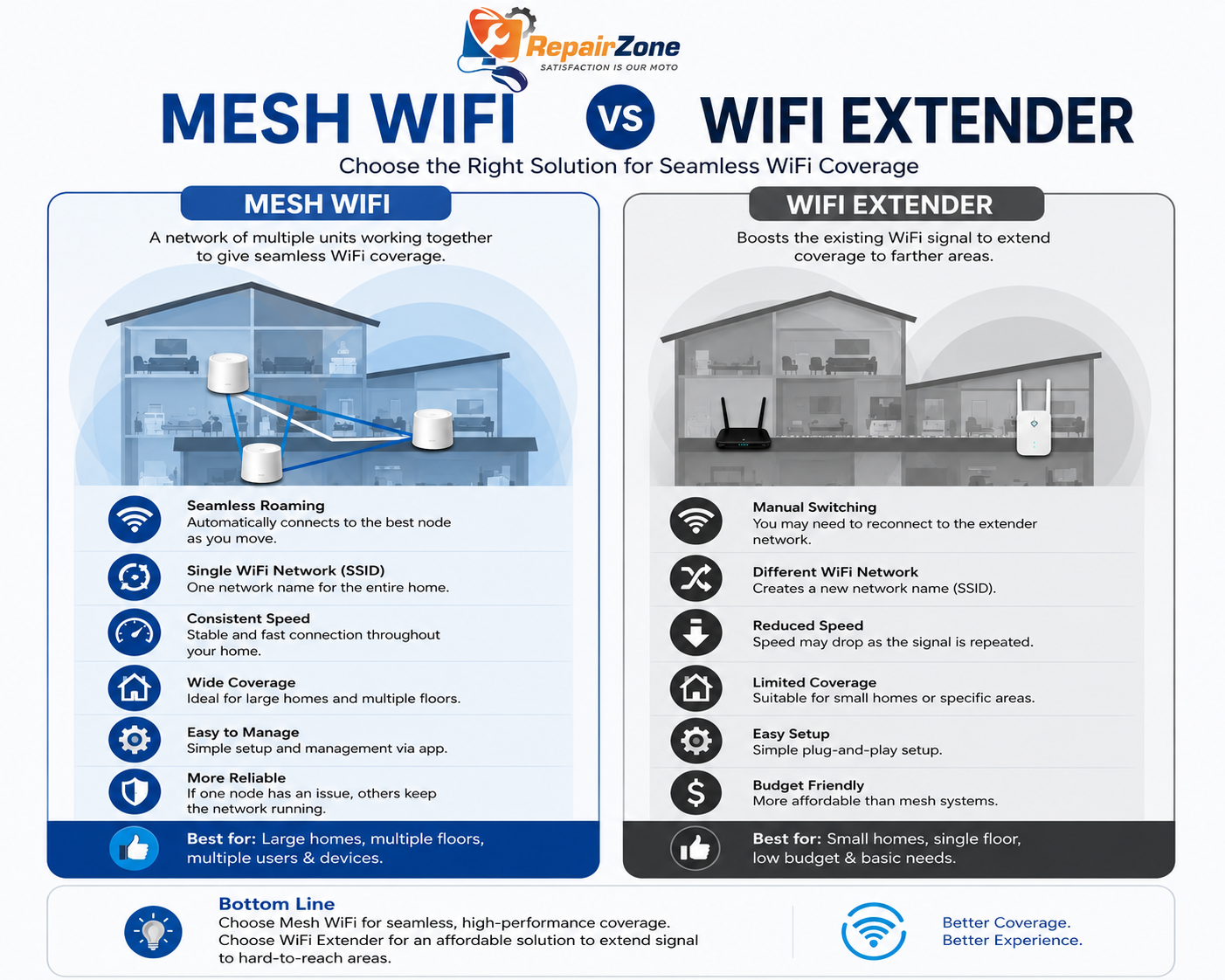
Mesh WiFi vs WiFi Extender – If you’re dealing with weak WiFi in certain rooms, you’ve probably come across two common fixes: a WiFi extender or a mesh WiFi system. They sound similar, but they work very differently — and choosing the wrong one is one of the most common reasons Dubai homes and offices still struggle with dead zones after buying new equipment.
The Quick Answer
A WiFi extender rebroadcasts your existing signal — it’s cheap and easy but loses speed and reliability the further it sits from your router. A mesh WiFi system uses multiple nodes that communicate directly with each other, delivering full-strength coverage throughout your entire home under one seamless network. For most Dubai apartments and villas, mesh WiFi is the more reliable long-term fix — but extenders still have a place for small, mild signal gaps.
What Is a WiFi Extender?
A WiFi extender (also called a repeater or booster) picks up your existing router’s signal and rebroadcasts it further into your home. It’s typically a single plug-in device placed somewhere between your router and the weak-signal area.
The catch: extenders usually create a second network name, meaning your phone or laptop doesn’t automatically switch to the stronger signal — you often have to do it manually. They also tend to use roughly half their available bandwidth just to communicate back to the router, which means speeds in the extended area are noticeably slower than your main connection.
What Is Mesh WiFi?
A mesh WiFi system uses multiple interconnected nodes placed around your property to create a single, seamless wireless network. Each node communicates with the others — often using a dedicated backhaul channel — so your devices automatically connect to whichever node has the strongest signal as you move through your home, with no manual switching and no separate network names.
Mesh systems are particularly effective in larger Dubai villas, multi-floor apartments, and properties with thick concrete walls — the kind of layouts where a single router or extender simply can’t reach every room.
Does Mesh WiFi Replace My Existing Router?
In most cases, yes. The main mesh node typically connects directly to your ISP’s modem or ONT and takes over the routing function, while your old router can either be retired or repurposed as a wired access point. You don’t need to change your internet plan or ISP — mesh systems work with your existing connection from Etisalat (e&), du, or any other UAE provider; they simply replace how that connection is distributed around your property.
Mesh WiFi vs WiFi Extender — Side-by-Side Comparison
| Factor | WiFi Extender | Mesh WiFi |
|---|
| How it works | Rebroadcasts existing signal | Multiple nodes form one unified network |
| Network name | Often creates a separate SSID | Single SSID across all nodes |
| Speed at distance | Drops noticeably the further you go | Stays consistent across the property |
| Roaming between rooms | Manual network switching often required | Automatic, seamless handoff |
| Gaming & video calls | Higher latency, more jitter the further from router | Consistent low latency across nodes, especially with wired backhaul |
| Smart home / IoT devices | Struggles with many devices on one rebroadcast point | Handles high device density well across multiple nodes |
| Best for | One small dead spot close to the router | Whole-home or whole-office coverage |
| Setup complexity | Simple, single device | Slightly more involved, multiple nodes |
| Upfront cost | Lower | Higher, but better long-term value |
| Ideal property type | Small apartments, one mild weak spot | Villas, multi-floor units, thick-wall buildings |
Why Mesh WiFi Usually Wins in Dubai Properties
Dubai’s building stock — particularly villas in Arabian Ranches, Dubai Hills, and The Springs, and high-rise apartments in Dubai Marina, JLT, and Business Bay — creates two very specific WiFi challenges: reinforced concrete that blocks signal between floors, and dense neighbouring networks that cause interference. Extenders struggle with both of these, because they depend entirely on the strength of the signal they’re rebroadcasting.
Mesh systems solve this by giving each node its own connection point, rather than relying on a single weakening signal chain. This is why RepairZone technicians recommend mesh WiFi as the default solution for most Dubai villas and multi-floor apartments, reserving extenders only for small, specific situations.
Wired Backhaul vs Wireless Backhaul — Which Performs Better?
“Backhaul” refers to how mesh nodes communicate with each other and with the main router. Most mesh systems use wireless backhaul, where nodes talk to each other over the air — convenient, but it shares bandwidth with your devices’ own traffic. Where Ethernet cabling is available (or can be discreetly run), wired backhaul connects nodes directly via cable, delivering full speed with zero wireless overhead.
For most homes, wireless mesh backhaul is more than sufficient. But for properties with heavy usage — multiple people gaming, streaming, or on video calls simultaneously — RepairZone technicians often recommend wiring at least the first one or two nodes for maximum performance, while remaining nodes connect wirelessly. This hybrid approach typically outperforms a fully wireless mesh setup, giving you the best of both architectures without the limitations of either approach alone.
Mesh WiFi and WiFi Extenders for Gaming and Video Calls
If low latency matters to you — competitive gaming, video conferencing, or VoIP calls — the architecture you choose matters more than the marketing spec sheet. WiFi extenders add an extra wireless “hop” between your device and the router, which increases ping and can introduce jitter, especially under load. Mesh systems, particularly with wired backhaul on key nodes, keep latency low and consistent because each node has a more direct, less congested path back to your main connection.
For remote workers who need reliable video calls in every room, and for gamers who notice every millisecond of lag, mesh WiFi with strategic wired backhaul is almost always the better-performing setup compared to an extender.
Future-Proofing: WiFi 6, WiFi 6E, and WiFi 7
Newer WiFi standards (WiFi 6, 6E, and the emerging WiFi 7) bring higher speeds, better handling of multiple connected devices, and reduced interference in crowded environments — which matters a lot in dense Dubai apartment buildings. These standards are now common in both extenders and mesh systems, but mesh systems benefit more, since their multi-node architecture is specifically designed to take advantage of the additional bandwidth and device-handling improvements these standards offer.
If you’re investing in new equipment, choosing mesh hardware that supports at least WiFi 6 ensures your network stays capable as more smart home devices, streaming services, and connected gadgets get added over the next few years.
When a WiFi Extender Is Still the Right Choice
Extenders aren’t obsolete — they’re simply built for a narrower job. An extender makes sense when:
- You only have one room with a mild (not total) signal drop
- That room is reasonably close to your main router
- You want a quick, low-cost fix without reconfiguring your whole network
- You’re not concerned about manually switching networks occasionally
If your dead zone is more severe — no signal at all, multiple rooms affected, or a separate floor entirely — an extender will almost always disappoint, because it has little or no signal left to rebroadcast in the first place.
When Mesh WiFi Is the Better Investment
- Villas or townhouses with two or more floors
- Apartments with thick walls or unusual layouts
- Properties with multiple dead zones, not just one
- Homes or offices with many connected devices — smart home gear, multiple laptops, streaming devices
- Remote workers who need consistently reliable video calls in every room
- Gamers and households where low latency matters
- Anyone tired of manually switching networks or restarting extenders that “stop working” intermittently
How to Test Which Solution Your Property Actually Needs
Before buying anything, a simple diagnostic check can save you money and a wasted return trip to the shop:
- Run a speed test at your router, then run the same test in the problem room — a large drop confirms a genuine coverage issue rather than an internet plan issue
- Check how many rooms are affected — one mild spot suggests an extender may work; multiple rooms or full dead zones point toward mesh
- Note your property’s layout — multiple floors or thick concrete walls almost always favour mesh over a single extender
- Count your connected devices — a high number of smart home devices, laptops, and streaming devices performs noticeably better on mesh
If you’d rather skip the guesswork, RepairZone offers a free on-site signal survey as part of every mesh WiFi installation, using proper signal-strength measurement rather than estimates.
Mesh WiFi for Small Offices in Dubai
For small offices with growing teams, the choice isn’t just mesh vs extender — it’s consumer-grade mesh vs business-grade access points. Consumer mesh systems work well for offices up to roughly 15-20 staff with straightforward needs. Beyond that, or where guest network isolation, VLAN segmentation, and centralised management are required, a business-grade access point setup is usually the better long-term investment. RepairZone configures both consumer mesh systems and full business internet installation services depending on your office size and requirements.
How RepairZone Helps You Choose the Right Option
Rather than guessing which solution to buy, RepairZone technicians assess your property before recommending anything. We measure signal strength room by room, check your property’s wall construction and layout, and identify whether a mesh system, a wired access point, or — in some cases — a properly placed extender is genuinely the most cost-effective fix.
Our mesh WiFi installation service includes a free on-site signal survey, professional node placement based on real signal data (not guesswork), and full network configuration so every device in your home connects automatically to the strongest available node. We install and configure all major mesh brands including Google Nest WiFi, TP-Link Deco, Eero, and Netgear Orbi.
If you’re starting from scratch with a new connection, our full Dubai internet installation services cover everything from ONT setup to final network configuration.
📞 Call or WhatsApp RepairZone now for a same-day mesh WiFi assessment and installation across Dubai.
Frequently Asked Questions
Is mesh WiFi always better than a WiFi extender?
Not always — for a single small dead spot close to your router, an extender can be a perfectly adequate, low-cost solution. But for villas, multi-floor properties, or homes with more than one weak area, mesh WiFi delivers significantly better speed, coverage, and reliability.
Can I use a WiFi extender and mesh system together?
Technically yes, but it’s rarely necessary — and can sometimes cause network conflicts. If you already have a mesh system and still have a gap in coverage, the better solution is usually to add another mesh node rather than introducing a separate extender.
How many mesh nodes do I need for my Dubai villa or apartment?
Most Dubai apartments need 1-2 nodes, while villas typically require 2-4 depending on the number of floors and overall size. RepairZone’s free signal survey determines the exact number needed for your specific property.
Will switching from an extender to mesh WiFi require new cabling?
Not necessarily. Most mesh systems communicate wirelessly between nodes, so no new cabling is required in most homes. For larger properties or where maximum performance is needed, wired backhaul between select nodes can further improve speed and stability.
Can I just buy a more expensive extender instead?
A higher-end extender may improve things slightly, but it still relies on rebroadcasting an existing signal — so in a true dead zone, even premium extenders often underperform compared to mesh. If the room has little to no signal to begin with, no extender can fully fix that.
Does mesh WiFi work with my current internet provider?
Yes. Mesh WiFi systems work with all major UAE ISPs, including Etisalat (e&) and du, and simply replace or work alongside your existing router without requiring any change to your internet plan.
Why does my WiFi extender sometimes make my connection slower?
Most extenders use a single radio to both receive and rebroadcast the signal, which roughly halves the available bandwidth in the extended area. Add in the extra wireless “hop” and any interference, and the result is often noticeably slower speeds than connecting directly to the main router — even though the extender shows a connected signal.
Is mesh WiFi worth it for a small apartment?
For a small one or two-bedroom apartment with no major dead zones, a single good router may already be sufficient, and a basic extender can fill small gaps. Mesh becomes worth the investment once you have multiple rooms with weak signal, thick walls, or a high number of connected devices.